Anthropic's guide to turning your manual code checks into skills that fix their own findings
- After the AI edits code, it can already see compiler errors, type failures, failing tests, and linter warnings. The checks only you know about are the ones you end up clicking through by hand, every single time.
- The Claude Code team's answer: write down those steps you keep repeating, in plain language, and save them as a skill. Then it runs them itself and fixes what it finds. The smallest example is about a dozen lines.
- Writing a good check is only half of it. The other half is which layer it lives in: you invoke it when you remember, it rides along inside the skill that generates the code, one skill calls the next automatically, or it gates every PR. Later layers take less of your attention and are harder to change.
- Anthropic's own Claude Code team runs a four-skill relay day to day:
/code-reviewfinds bugs,/simplifycleans up the diff,/verifyactually boots the app and looks at the result, and if the change touched UI they call a custom/designthat checks it against DESIGN.md. - The costs are stated openly: once a skill loads, it stays in context for the rest of the session, so longer chains burn more tokens. And since v2.1.215,
/verifyand/code-reviewonly run when you ask for them — they never fire on their own.
Which checks the AI handles after an edit, and which still land on you
Anthropic's team published how they build verification loops in Claude Code: take the checks you do by hand and turn them into skills, so the AI corrects itself. Written by Delba de Oliveira of the Claude Code team, published July 22.
A verification loop just means Claude checks its own work after writing code and fixes what it finds — no one has to sit at the keyboard supervising.
Here's roughly how it goes today. You ask the AI to change a feature, it reports back that it's done, and then you open the page and click through it, glance at the logs, and drag the browser window down to phone width. Those few motions are on you every time. Those are what you're handing over.
Start with the shape of the full loop.
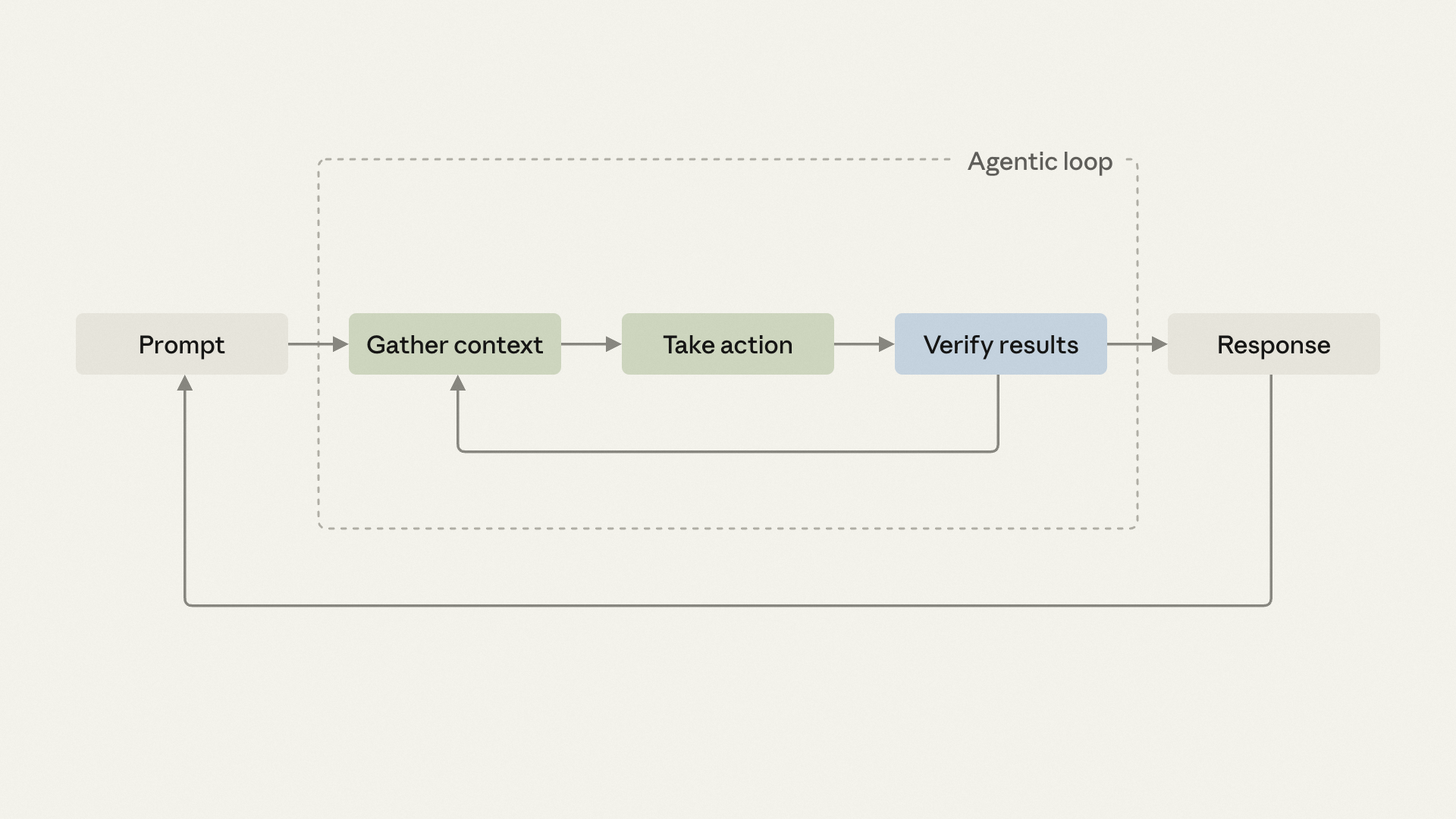
One detail in this diagram the post doesn't mention: when verification fails, the arrow points back to "gather context," not to "take action." It doesn't retry the same edit with the same information — it goes back and re-reads the situation before deciding what to do next.
It already handles part of the verification step, because a codebase is full of signals a machine can read directly: compiler errors, type failures, failing tests, linter warnings. The moment one appears, it sees it and knows to circle back.
The other half is the problem.
- Compiler errors
- Type check failures
- Failing tests
- Linter warnings
- Whether this button gets clipped at phone width
- Whether this error log dumps the user's request body
- Whether the migration that dropped a column backfilled the data
- Whether this change follows your team's design spec
Nothing in the right-hand column raises a flag for you. So they fall back to you every time, as those few manual clicks. The job now is to turn them into signals it can read too.
The six checks that ship with Claude Code, and what each covers
Before writing anything from scratch, look at what's already built in. Claude Code ships six, each sitting at a different point in the loop — some you invoke, some run on their own.