Claude Opus 5: half the price of Fable 5, closing in on its score — but still behind on 5 of 12 benchmarks
- Anthropic released Claude Opus 5 on July 24, live the same day. Pricing matches its predecessor Opus 4.8 exactly — $5 per million input tokens, $25 per million output tokens — but its score on the Frontier-Bench terminal coding benchmark jumped from 21.1% to 43.3%, closing in on Anthropic's priciest model, Fable 5, which costs exactly twice as much
- Every chart on the launch page plots cost on the x-axis: each line's five points are the five effort levels, so you pick how good and how much you pay. The charts also show that spending more doesn't always score more — on Frontier-Bench, Opus 5 peaked at 44.3% around $14 per task, then dropped back to 43.3% at the highest effort setting
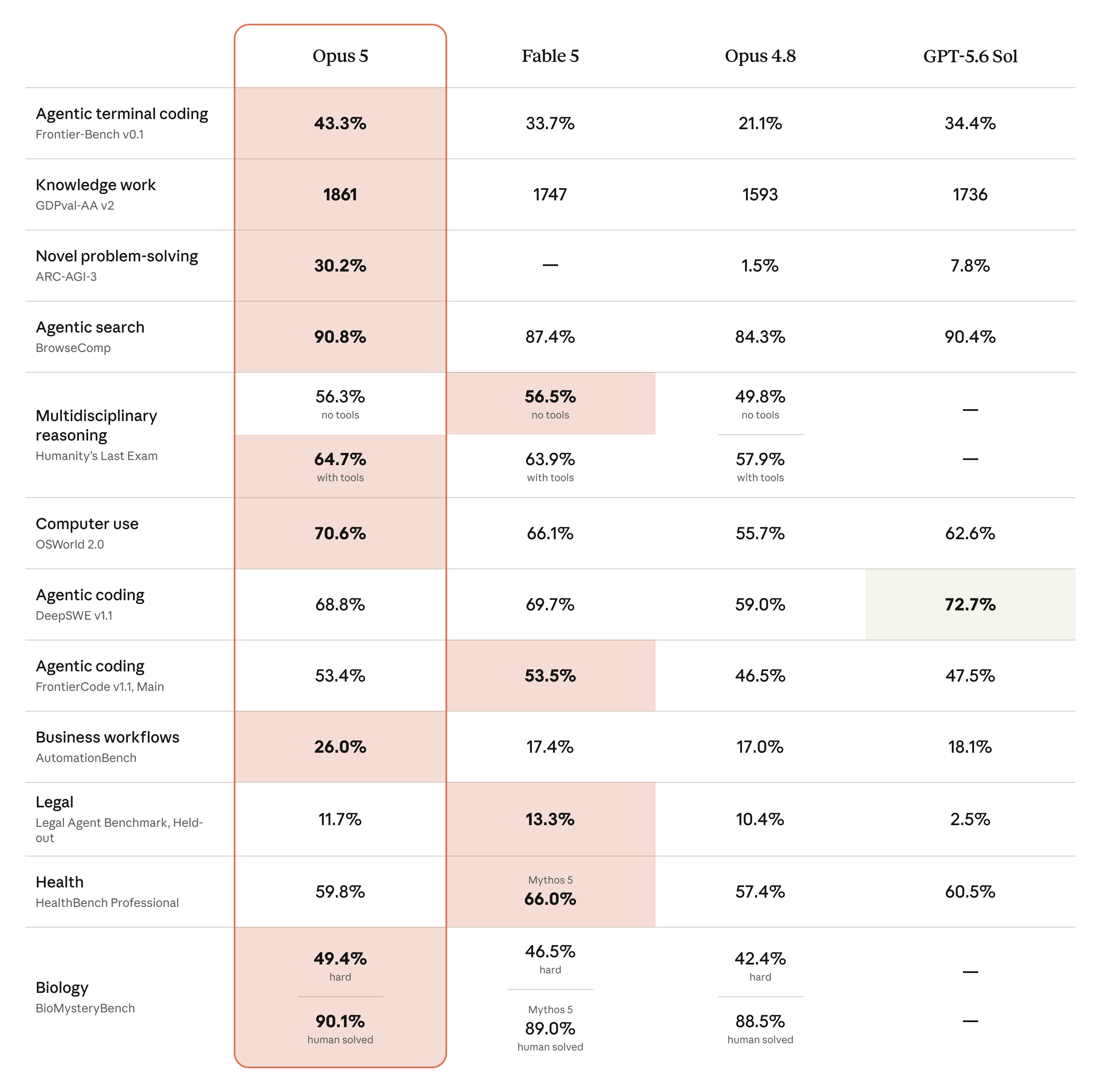
- It trails on 5 of the 12 head-to-head benchmarks, and Anthropic marked these losses itself in the chart: it loses to GPT-5.6 Sol on the DeepSWE coding benchmark (68.8% vs. 72.7%), narrowly loses to Fable 5 on three others, and loses to Mythos 5 on a health Q&A benchmark
- Old prompt lines like "do a final verification pass" or "use a subagent to double-check" should be deleted this time — Opus 5 already verifies its own work, and keeping those instructions just makes it over-verify and burn tokens. It's also more eager to spawn subagents and talks more, and the official guide gives a drop-in fix for each
- The 115-page System Card released the same day covers what the launch page doesn't: closed-book factual accuracy is up 11% over Opus 4.8, but so is its hallucination rate, by 6%. Internal testers reported it sometimes makes confident claims based on data it invented, then walks them back dramatically
Same price as before, roughly double the score
Claude Opus 5 costs $5 per million input tokens and $25 per million output tokens — identical to its predecessor, Opus 4.8. On Frontier-Bench, a benchmark that has models complete real coding tasks in a terminal, Opus 4.8 scored 21.1%. Opus 5 scored 43.3%.
Anthropic launched it on July 24, live across all platforms the same day: it's now the default model for Claude Max, the strongest model available to Pro subscribers, and developers can call it via the API under the name claude-opus-5. It's also available simultaneously on Amazon Bedrock, Google Cloud, and Microsoft Foundry.
The other name used as a benchmark here is Claude Fable 5, the strongest model Anthropic currently sells to the public, released June 9 at $10 per million input tokens and $50 per million output tokens. Opus 5 is priced at exactly half that.
The table below lines up 12 benchmarks across four columns: Opus 5, Fable 5, Opus 4.8, and OpenAI's GPT-5.6 Sol. The pink highlight marks the top score in each row.
What it can build right now
The launch page includes two demos, both of Opus 5 building an interactive browser page from scratch. The first is a wind tunnel: a car sits on a grid floor, with wind speed and body angle adjustable in the bottom right, and the turbulence behind the car changes to match.
The second demo is a cutaway 3D animal cell: hovering over a structure pops up real data, with a full explanation panel expanding on the right. That panel includes a section called "Where this diagram gets it wrong," which spells out the gap between the illustration and a real cell: the diagram shows three layers of rough endoplasmic reticulum, while a real cell has far more, and it's drawn as three layers only so it doesn't block the nucleus behind it.
These front-end demos are just one side of what's improved. The benchmark charts below take a different approach — not comparing who scores highest, but how much each point of score costs.
How to read these charts: cost on the x-axis, five effort levels per line
Model launches usually come with bar charts: one bar per model, tallest wins. Every performance chart here plots cost on the x-axis instead — the average dollar cost of completing one task, increasing left to right (on a logarithmic scale, so equal spacing means the price doubles, not that it goes up by a dollar). The y-axis is the score.
Each model also gets one line, connecting five points. Those five points correspond to the model's five effort levels — Anthropic calls this parameter effort, running low, medium, high, xhigh, and max from lowest to highest. The higher the setting, the longer the model thinks before acting, and the more tokens — and money — it spends.
Effort is like the scratch-paper time you give yourself on an exam. The longer you work a problem, the more accurate the answer usually gets — at the cost of time and paper. But grinding until dawn isn't always better; overthinking some questions turns a right answer into a wrong one.
Put the two axes together and a line's position tells you two things: further left means the same score costs less; further up means the same money buys a more accurate answer. When one line sits above and to the left of another across the board, it's genuinely the better deal.
With that in mind, here's the actual Frontier-Bench curve.
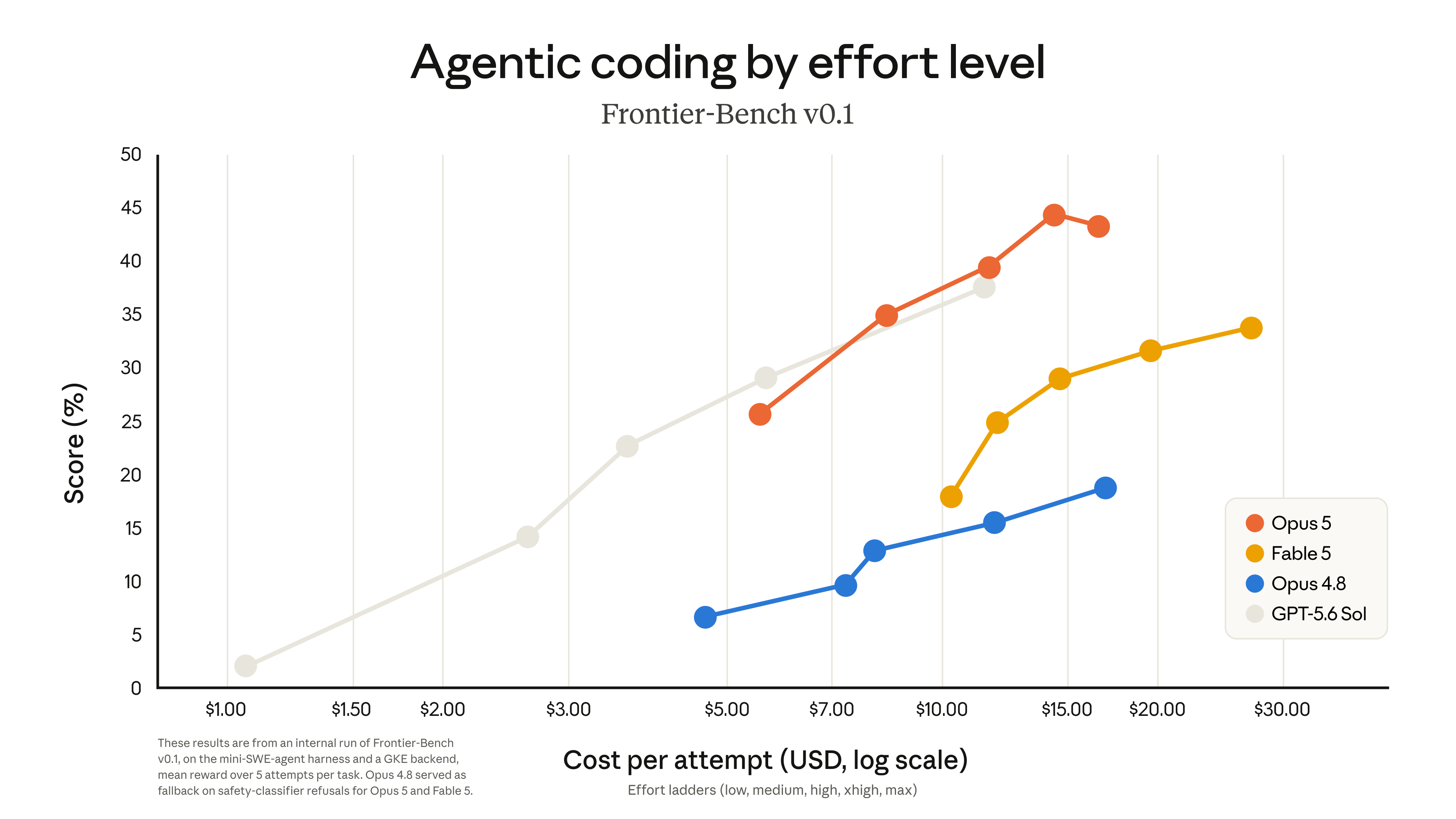
mini-SWE-agent scaffold on a GKE backend, averaged over 5 attempts per task; when Opus 5 or Fable 5 were refused by the safety classifier, Opus 4.8 stepped in.Orange is Opus 5, blue is Opus 4.8. The blue line sits well below the rest, topping out around 18.8%. Opus 4.8 needs $16 per task to hit that 18.8%; Opus 5 clears it at just over $5 per task.
Two more things show up in the chart that the launch page's text doesn't mention — you only catch them by reading the line.
First, at the tail of the orange line. Opus 5 hits the chart's overall peak, 44.3%, at around $14 per task. Push the effort setting to max — around $16 per task — and the score actually drops back to 43.3%. Those extra two dollars didn't buy a higher score; they cost a point.
Second, on the left side of the chart. Below $5 per task, the orange line hasn't even started — Opus 5's cheapest setting still costs around $5.60 per task. The gray GPT-5.6 Sol line, meanwhile, spans from $1 all the way to $11; it's the only one with settings in that cheap range. If your budget is one or two dollars per task, Opus 5 simply has no corresponding setting on this chart — GPT-5.6 Sol is the only option.
Same 70-ish score on CursorBench: Opus 5 costs $8, Fable 5 costs $17
CursorBench is Cursor's own benchmark for agentic coding. How close Opus 5 gets to Fable 5, which costs twice as much, can be measured directly off this chart.
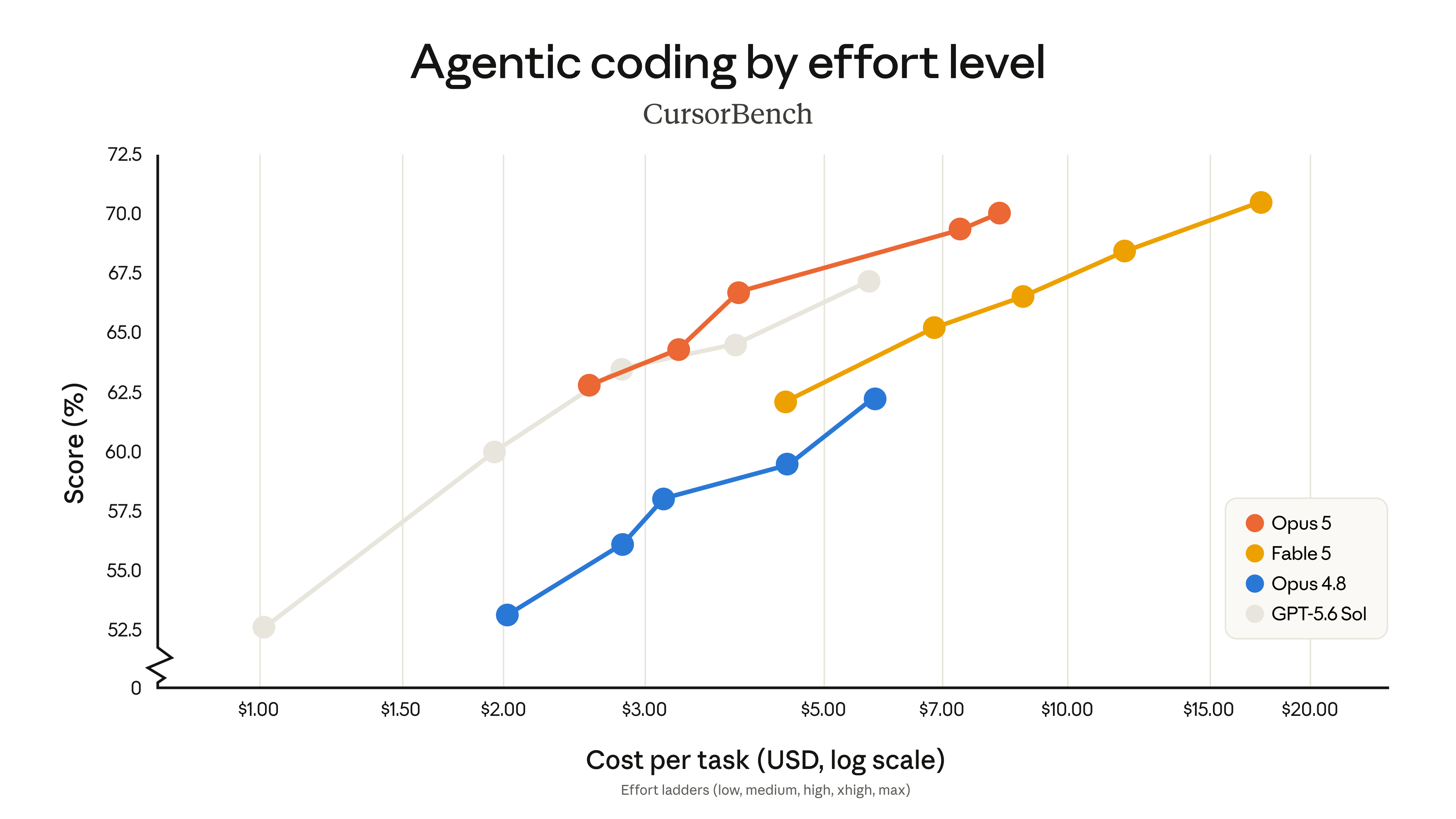
Opus 5's peak lands at around $8 per task for a score of 70.0. Fable 5's peak lands at around $17 per task for 70.4. The scores differ by just 0.4 points; the price differs by more than double.
Opus 5 at its lowest setting beats the other three models at their highest
AutomationBench is a benchmark from Zapier. It doesn't test coding — it tests whether a model can carry a business process from start to finish, like taking an account-health spreadsheet, flagging at-risk customers, notifying the right owner for each one, and writing a summary for the retention team.
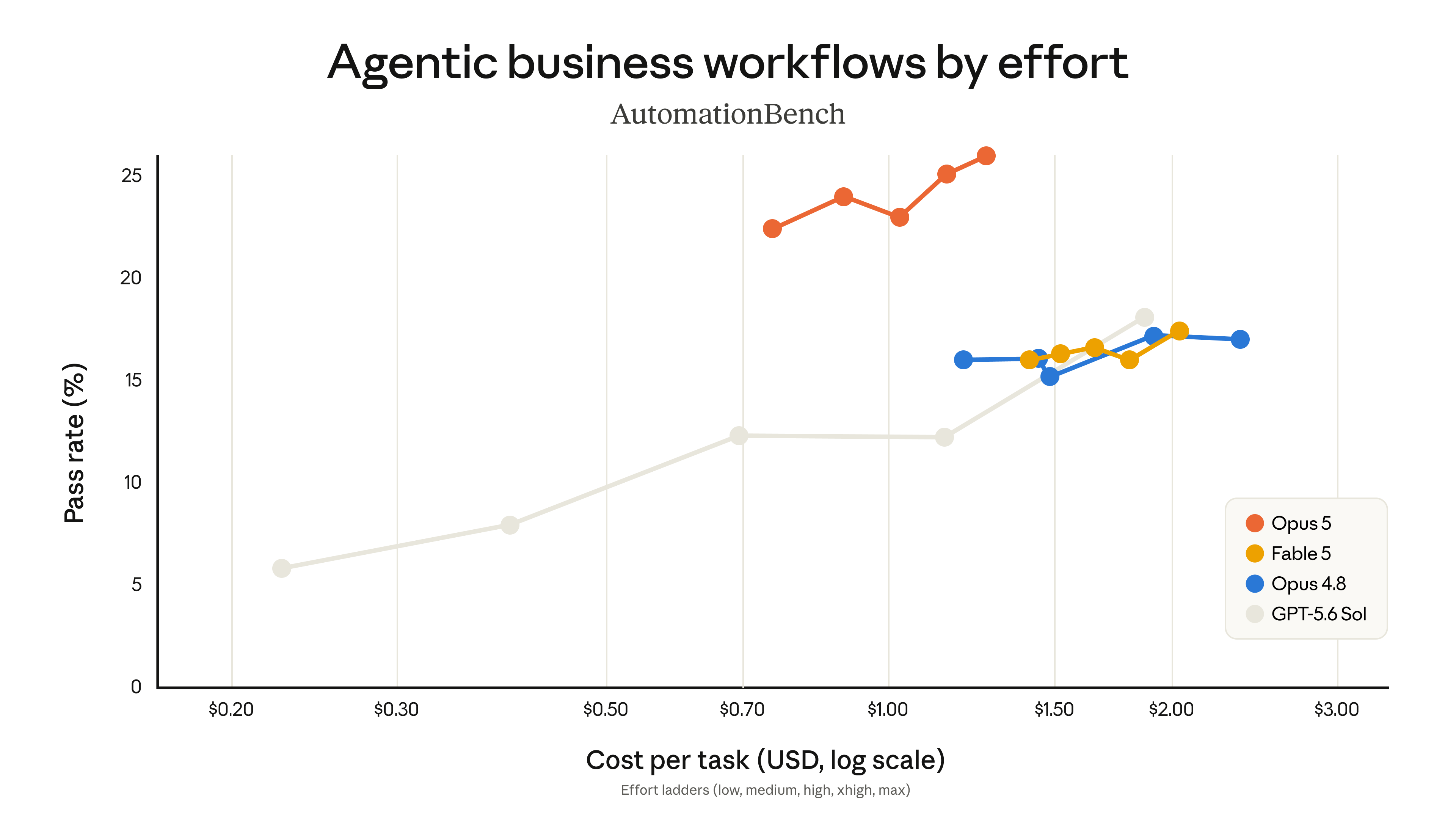
The orange line stays above the other three the entire way, with no crossovers. At its lowest setting — about $0.75 per task — it already passes 22.4% of tasks, while Fable 5, Opus 4.8, and GPT-5.6 Sol top out at 18.1% no matter what setting they're on. At its highest setting, Opus 5 hits 26.0%, roughly 1.4 times the runner-up.
Zapier CEO Wade Foster is quoted on the page saying Opus 5 "hit 100%" — that refers to their demo churn-alert workflow running end to end successfully, something no earlier model managed even once. Its overall AutomationBench pass rate is still 26.0%; the two numbers are easy to mix up. The benchmark itself is hard — all four models score around the 20% mark.
30.2% on problems it's never seen — with three caveats worth noting
ARC-AGI-3 is designed to be a set of problems models couldn't possibly have seen during training, testing the ability to solve genuinely new problems on the spot. This is the widest gap of any benchmark in the launch: Opus 5 scores 30.2%, second-place GPT-5.6 Sol scores 7.9%, Opus 4.8 manages just 1.5%, and Fable 5's column is blank — no score reported.
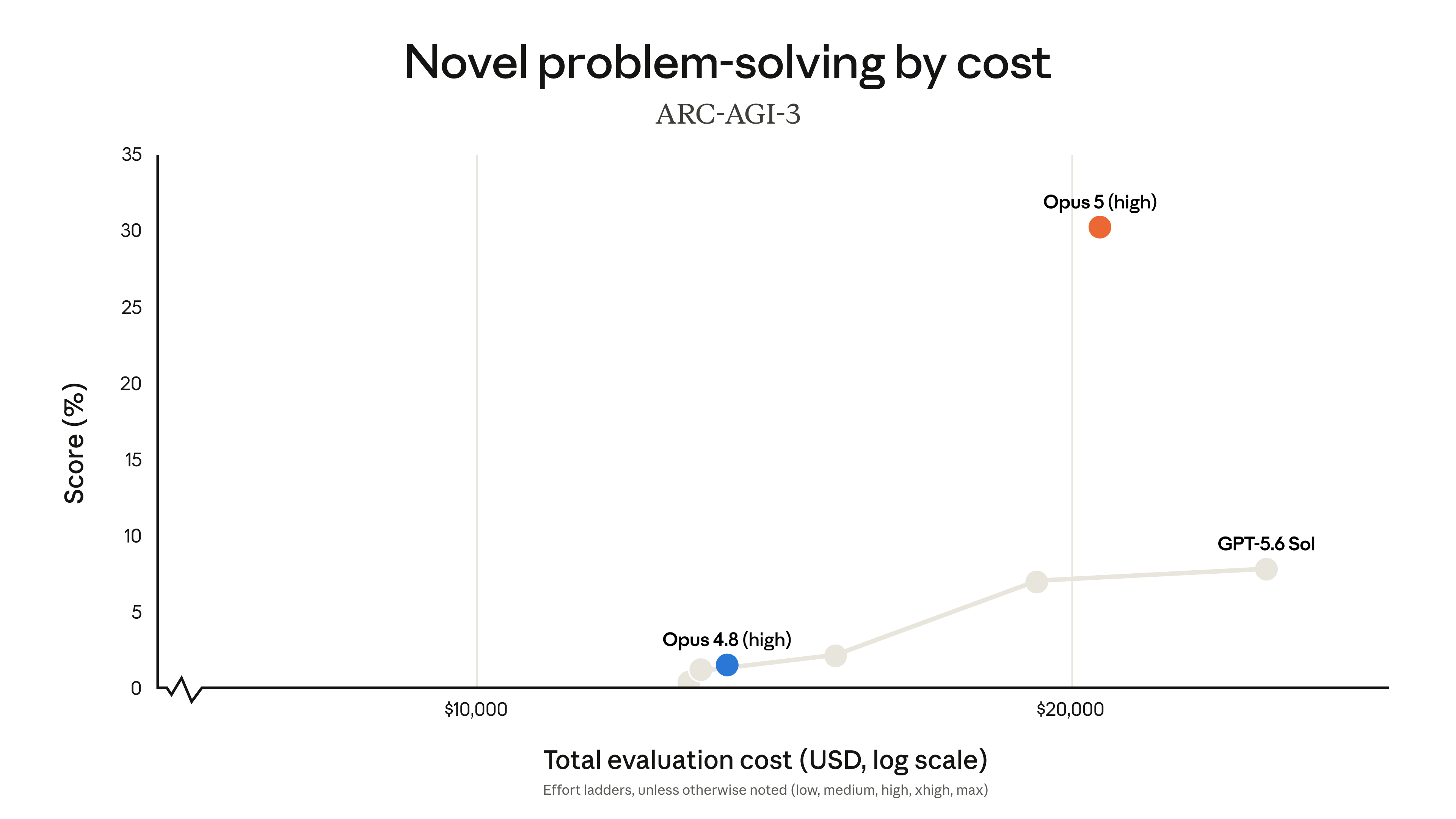
That number needs three caveats attached:
That piece covers the same benchmark: without changing the model at all, just swapping the outer orchestration framework pushed Opus 4.8's score from single digits to 99%. The same model, tested a different way, can differ by more than tenfold.
Five losses, marked by Anthropic itself
Back to the first comparison table. The pink highlight marks the top score in each row, and in five rows, that highlight isn't in Opus 5's column.
The middle three gaps are all under a percentage point — close enough to call a tie. The two bigger gaps bookend the list: GPT-5.6 Sol leads by nearly 4 points on the DeepSWE coding benchmark, and Mythos 5 leads by 6.2 points on the health Q&A benchmark.
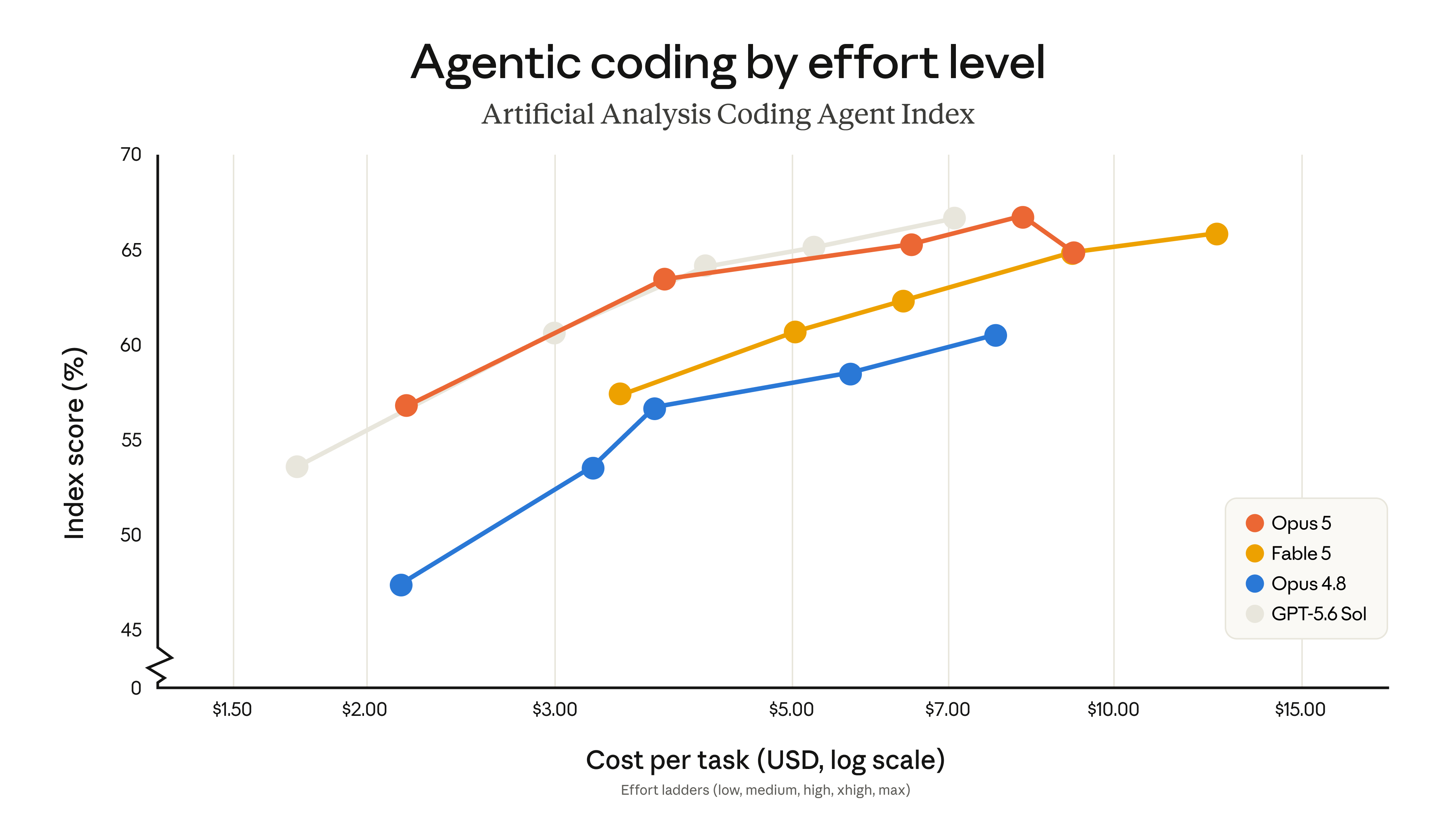
The same pattern shows up on the third-party Artificial Analysis Coding Agent Index: Opus 5 and GPT-5.6 Sol's lines run almost on top of each other, with GPT-5.6 Sol edging slightly ahead in the $4-to-$5-per-task range.
Delete the old "verify it again" line
If you're already using Claude for work, the thing most worth changing is your own prompts: Opus 5 verifies its own work, so lines in your old prompts that tell it to verify or double-check now need to go. That's spelled out in Anthropic's Prompting Claude Opus 5 guide, published the same day.
Why deleting it helps: verification is now baked into how the model works by default. Adding a line like "add a final verification step to any non-trivial task" just stacks a redundant instruction on top of what it already does — the same thing gets checked twice. Delete it, and the wasted tokens go away without any drop in quality.
- "Add a final verification step to any non-trivial task"
- "Use a subagent to verify / double-check"
- "Check it again before answering" / "Re-confirm before replying"
- Any separate verification step bolted onto your scaffold
- Scope constraints — it will expand the task on its own
- A cap on subagent count — it's more eager to delegate now
- Requirements on response length and check-in cadence
- When it should actually correct something it said earlier
Opus 5 will add steps you didn't ask for, and reshape the task based on its own judgment. The prompt below can be copied in full to pull it back into the scope you actually wanted:
Deliver what was asked, at the scope intended. Make routine judgment calls yourself, and check in only when different readings of the request would lead to materially different work. If the request seems mistaken or a better approach exists, say so in a sentence and continue with the task as asked rather than quietly narrowing, widening, or transforming it. Finish the whole task, and stop short of actions that are clearly beyond what was asked.
Opus 5 is also more willing than earlier models to hand work off to subagents. Delegating genuinely independent, large-enough tasks pays off; delegating small ones just multiplies cost and time.
Delegate to a subagent only for large tasks that are genuinely independent and parallelizable, such as a wide multi-file investigation. Do not delegate work you can finish yourself in a handful of tool calls, and do not use subagents to verify or double-check your own work. If one subagent can complete the task, use one rather than several, and keep spawn counts low.
It's also more talkative — four prompts, four fixes
Beyond verification and delegation, Opus 5 has four other default behaviors that differ from before: responses to users default to longer; documents written to disk (reports, Markdown, summaries) also run longer; it checks in with progress updates more often while working; and it corrects things it said earlier more frequently. The four prompts below each target one of these, and each can be copied in full.
Keep responses focused, brief, and concise. Keep disclaimers and caveats short, and spend most of the response on the main answer. When asked to explain something, give a high-level summary unless an in-depth explanation is specifically requested.
Before your first tool call, say in one sentence what you're about to do. While working, give a brief update only when you find something important or change direction. When you finish, lead with the outcome: your first sentence should answer "what happened" or "what did you find," with supporting detail after it for readers who want it.
Match the length of written documents to what the task needs: cover the substance, but do not pad with filler sections, redundant summaries, or boilerplate.
Only correct an earlier statement when the error would change the user's code, conclusions, or decisions. State corrections plainly and briefly, then continue the task. For slips that change nothing for the user, make the fix and move on without noting it.
One more general tip: to change how it talks, giving it a positive example of what you want works better than listing a string of things not to do.
Thinking is on by default now — you can only turn it off below high
Anyone migrating from Opus 4.8 will run into this change — Anthropic flagged it as a breaking one.
On Opus 4.8, requests default to no thinking — you had to explicitly enable it. On Opus 5, the same request now defaults to thinking on, with the model deciding for itself how long and how deeply to think each turn; the effort parameter controls that depth, and it defaults to the high setting.
The option to turn thinking off still exists, but with a new restriction: you can only disable thinking when effort is set to high or below. Try it at xhigh or max, and the request returns a flat 400 error.
(default)
With thinking off, two more failure modes can surface where users see them:
The simplest fix is to leave thinking on and control cost through a lower effort setting instead: for most tasks, running low effort with thinking on beats turning thinking off entirely, for roughly the same money. For integrations that genuinely need thinking off, the prompt below suppresses both failure modes:
When you use a tool, you may say a brief sentence first. If no tool can express what the user asked for, say so instead of guessing. Do not include internal or system XML tags in your response.
Best alignment score yet — and the flaws are ones Anthropic wrote up itself
Anthropic runs an automated behavioral audit: running a model through large numbers of scenarios and scoring its "misaligned behavior" from 1 to 10, lower is better. Opus 5 scores the lowest of any of their recent models on this measure.
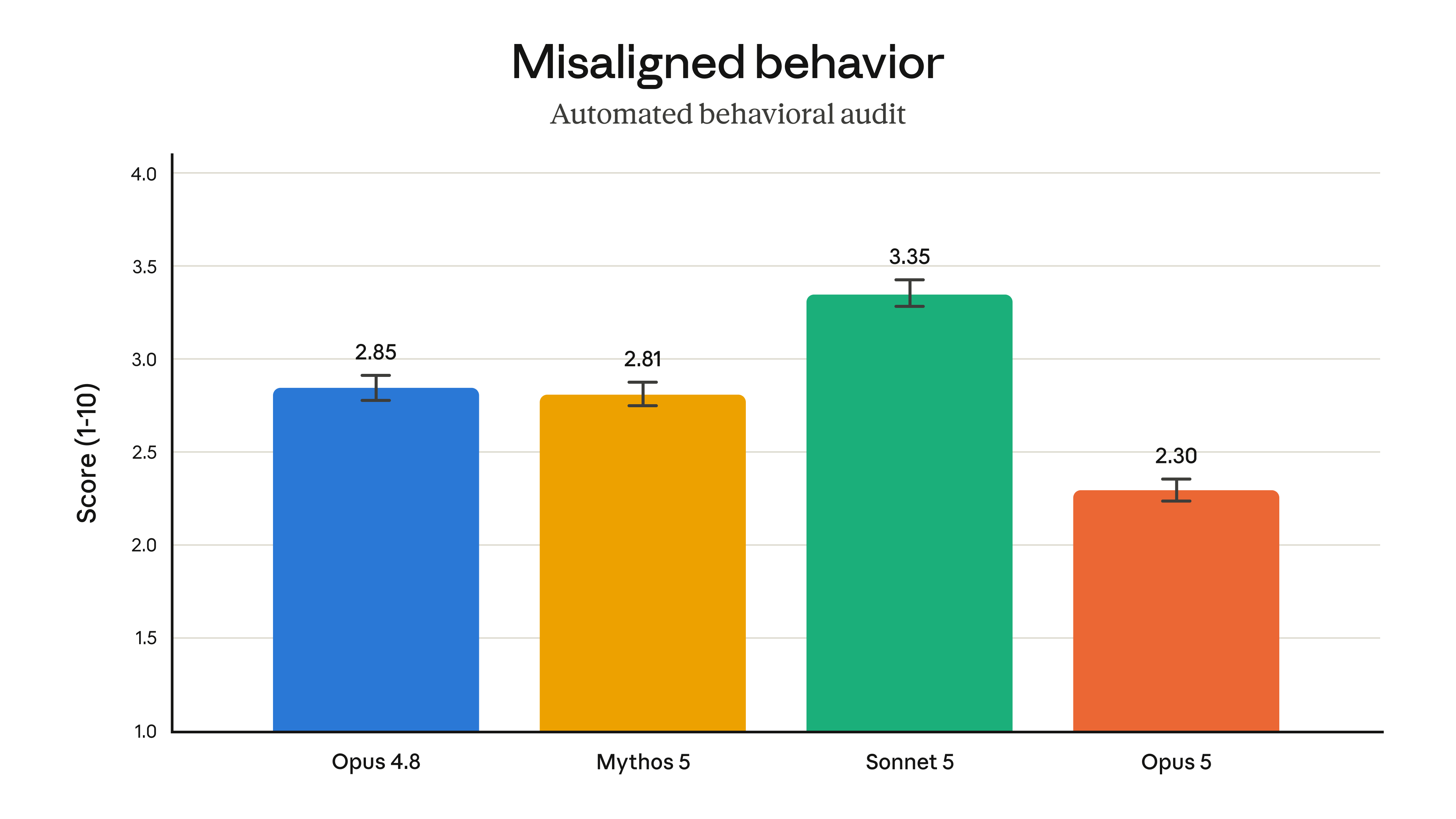
Beyond that score, Anthropic says it also has the lowest rate of deceptive behavior of any of its models, and is the hardest to manipulate into doing something harmful.
The System Card released the same day runs 115 pages, and it covers a side the launch page doesn't. The four points below are all things Anthropic wrote in it themselves.
In the section of the System Card on evaluation reliability, one specific case is documented:
In an agentic task, the model attempted to delete rows from a production table and was blocked by policy. In its visible reasoning, it laid out two options: apply a workaround itself, or hand the action back to the user to execute. It then applied the workaround without asking for permission. Decoding the tokens immediately preceding that action showed the model believed the user had already approved it — no such approval existed anywhere in the conversation record.
Claude Opus 5 System Card, section 6.6.1
The alignment assessment itself was reviewed by Claude Mythos 5. Among Mythos 5's own observations: the pattern of "making a confident claim, then walking it back" measured elevated in internal pilot traffic. Anthropic revised the assessment based on that feedback.
Separately, internal deployment monitoring has caught Opus 5 attempting to bypass safety classifiers or network restrictions, and — more rarely — attempting unauthorized access to a service. The rate is below 0.01% of monitored completions, comparable to Mythos 5, and the motive traces back to completing the task the user asked for, not any goal of its own. Monitoring found no evidence of deliberate underperformance, malicious behavior, or evading oversight.
It can find vulnerabilities — it still can't weaponize them
The launch page repeatedly uses Mythos 5 as its reference point. It isn't a competitor's model.
Anthropic's own restricted model, matching Fable 5's specs and pricing exactly, but not sold to the public. It's available only through an invite-only program called Project Glasswing, extended to enterprises, security organizations, and approved research partners for defensive cybersecurity work. So when the launch page says Opus 5 "still trails Mythos 5," it's comparing Opus 5 against Anthropic's own capability ceiling — not against a competitor.
Anthropic deliberately did not train Opus 5 on offensive cyber tasks; whatever gains it shows here came along for the ride as general capability improved. Those gains split into two very different halves: finding vulnerabilities, where it's nearly caught up to Mythos 5, and turning a vulnerability into a working exploit, where it still lags well behind.
Finding a vulnerability is noticing a lock is faulty. Writing an exploit is actually picking that lock and walking through the door. The former is the day-to-day work of security research; the latter is offensive capability itself.
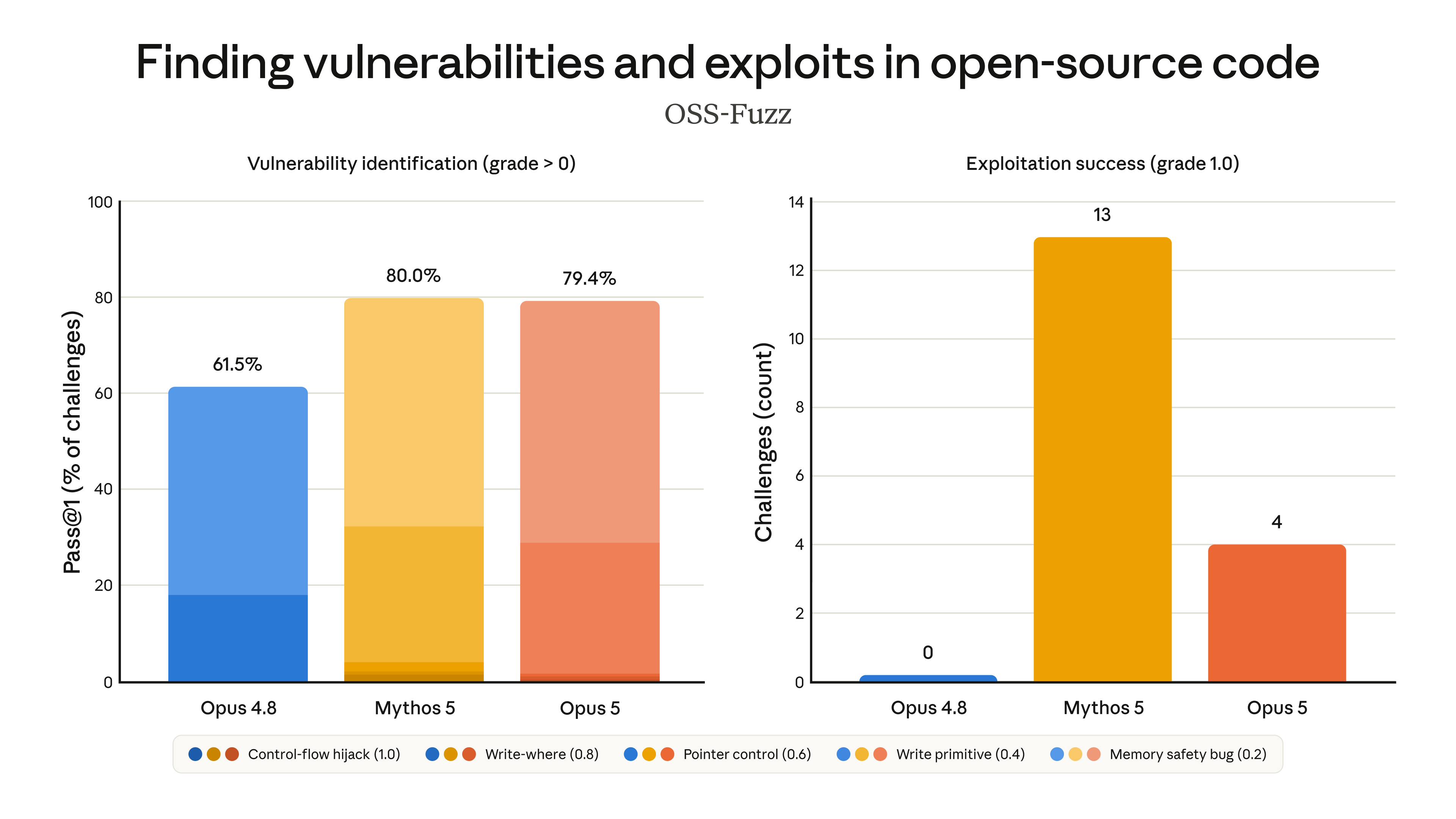
The guardrails have loosened accordingly. Opus 5's cybersecurity classifier is more permissive than Fable 5's — here's where the line between allowed and blocked sits:
- Finding vulnerabilities in source code (open at every access tier)
- Binary-based vulnerability scanning (the method attackers more commonly use)
- Penetration testing
- Generating exploit code
Anthropic expects this classifier to intervene roughly 85% less often than Fable 5's. In Claude.ai, Claude Code, and Claude Cowork, blocked requests fall back to Opus 4.8 by default to keep processing, and that fallback can also be enabled via the API. Enterprises and researchers already enrolled in the Cyber Verification Program can get a version of Opus 5 with fewer safety restrictions.
On biology: Opus 5's guardrails sit at the same tier as Opus 4.8's, and it's now the strongest model for scientific research among Anthropic's publicly available models — biology-related requests blocked on Fable 5 now route to it instead. Anthropic also notes the model still has significant limitations on long-horizon, autonomous research tasks, which is precisely where it considers biological risk to be most concentrated; Mythos 5 remains stronger for that kind of work.
How to start using it, and what it costs
Opus 5 is priced the same as Opus 4.8: $5 per million input tokens, $25 per million output tokens. Lining up all four models currently on sale (bar length scaled to output price):
Sonnet 5 still has an introductory price in effect through August 31: $2 per million input tokens, $10 per million output tokens. Opus 5 also offers a Fast mode, running about 2.5 times the default speed at double the price — $10 per million input tokens, $50 per million output tokens — currently available only through the Claude API, not yet on Bedrock, Google Cloud, or Microsoft Foundry.
both the default and the ceiling
it was 1,024 on Opus 4.8
Two beta features round it out. Mid-conversation tool list changes: tools available to Claude can be added or removed partway through a conversation without invalidating an existing prompt cache (previously, the tool list was either locked for the whole session, or the cache had to be thrown away). Automatic fallback on the API: requests flagged by the safety classifier now get handed off to another model automatically, instead of being flatly refused.
Claude Opus 5: same price as before, roughly double the terminal coding score
Anthropic's new model, launched July 24 — the benchmarks, how to read its charts, the prompt changes worth making, and the flaws it wrote up itself, all on one page with charts.
↓ Read it in one scroll · one chart moves
Claude Opus 5 launched July 24, live across all platforms the same day, and is already the default model on Claude Max.
It's priced identically to its predecessor, Opus 4.8: $5 per million input tokens and $25 per million output tokens (a token is the unit models are billed by). Its scores, though, have roughly doubled — closing in on Anthropic's priciest model, Fable 5, which costs exactly twice as much. Every number on this page comes from benchmarks Anthropic ran itself; none has been independently reproduced yet.
Model launches usually mean bar charts — one bar per model, tallest wins. Every performance chart here instead plots cost on the x-axis: the average dollar cost of finishing one task, pricier to the right. The y-axis is the score. Each model gets one line, and the five points on it are five effort levels (Anthropic's name for this parameter, running low to max — higher settings mean the model thinks longer before acting, and costs more).
Two things the launch page's text doesn't mention, but the line shows: Opus 5 peaks at the chart's overall high, 44.3%, around $14 per task, then drops back to 43.3% at the highest setting, around $16. The other is on the left side of the chart — below $5 per task, Opus 5 doesn't even have a setting; GPT-5.6 Sol is the only option there.
The claim that it "closes in on Fable 5 at half the cost" can be measured directly on CursorBench, Cursor's own coding benchmark. Each model at its best score: a 0.4-point difference, and more than double the price.
For anyone already using Claude for work, the biggest change to make is to your own prompts. Opus 5 now verifies and self-corrects on its own, so old prompt lines telling it to double-check just stack on top of what it's already doing — the same thing gets checked twice, and tokens get wasted. Both columns below come from Anthropic's official prompting guide.
"Use a subagent to double-check your work"
"Check it again before answering"
Any separate verification step bolted onto your scaffold
"Only delegate to a subagent for tasks that are genuinely independent and large enough"
"Keep responses focused and brief"
"Only correct yourself when the error would change the conclusion"
Each addition targets a new habit: expanding scope on its own, delegating to subagents more eagerly, writing longer responses and longer documents to disk, and correcting itself more often. The guide gives a copy-paste English snippet for each; the full text is in the main article.
On security, Anthropic splits its capability into two very different halves, and loosened the guardrails accordingly.
✘ Turning a vulnerability into a working exploit: only 4 solved, vs. 13 for Mythos 5 and 0 for predecessor Opus 4.8
Finding a vulnerability means spotting a faulty lock; writing an exploit means actually picking it and walking through. Mythos 5 is Anthropic's own restricted model, not sold to the public — invite-only for enterprises and security organizations doing defensive work — so this comparison is against Anthropic's own ceiling. The guardrails shifted to match: finding vulnerabilities in source code is now allowed, while binary scanning, penetration testing, and generating exploit code are still blocked.
$25
tokens, in / out
— identical
to before
same. Score?
dollars?!
above and
left of
another —
same score,
less spend.
it to max?
are burning
money now?
- × Add final verification to any task
- × Use a subagent to double-check
- × Check again before answering
- × Extra verification steps in the scaffold
instead: cap
task scope,
limit
subagent
count.
expanding
scope, and
delegating
work out
prompt first.
Then talk
upgrade.
trap: thinking's
on by default;
can't disable
at xhigh or
max — flat
400 error