Tongyi releases Qwen-Audio-3.0-TTS, a speech model that can speak 16 languages and 20 dialects from a single voice sample
- Clone someone's voice and have it speak another language, and the timbre often turns into a different person entirely; add a bit of noise or echo to the reference clip and the whole thing falls apart.
- Tongyi Lab has released Qwen-Audio-3.0-TTS in two tiers — Flash and Plus — accessed through Alibaba Cloud Bailian's API, with Flash hitting first-packet latency in the low hundreds of milliseconds.
- One reference clip can speak across 16 languages without the voice drifting: on CV3-Eval, it ranks first in speaker similarity across all 16 languages, with Plus averaging 82.75 (out of 100 — the closer to 100, the more it sounds like the original speaker).
- Pronunciation accuracy isn't a clean sweep: average word error rate lands at 3.87 (Flash) and 3.96 (Plus), lowest in 10 of the 16 languages, with rivals beating it on the remaining 6.
- Writing tags like
[angry]or[giggles]straight into the text controls emotion and sound effects — 31 of them are documented officially. But this generation doesn't ship weights; running it locally still means falling back to the Qwen3-TTS open-sourced in January.
Tongyi just released a speech model that speaks 16 languages
Tongyi Lab launched the text-to-speech model Qwen-Audio-3.0-TTS on July 20.
Listen to it first. The clips below are the same voice speaking across languages: the reference is one line of Chinese, then the model reads out English, Japanese, and Korean using that voice. Don't worry about whether the pronunciation is correct — just listen for whether it still sounds like the same person.
Of the 16 supported languages, 7 are new this generation, clustered around Southeast Asia and the Middle East:
None of these were supported by the earlier open-source model, so products targeting Southeast Asia now have an option they didn't before.
Keeping the voice steady across languages is hard because timbre and pronunciation habits are tangled together. When a model learns someone's voice, it tends to learn their native accent as a package deal — switch to another language, and the pronunciation has to reorganize itself, dragging the timbre along with it.
It can speak 20 regional Chinese dialects
This is the easiest one for Chinese readers to judge for themselves, since you can usually tell right away when something sounds off. Give it a dialect reference clip, and it uses that same voice to read a different dialect passage.
The 20 dialect regions on the launch page span this range:
Shandong · Qingdao
Ningxia
Hunan
Ningbo · Jiangxi
Guizhou · Yunnan
It can still clone a voice from a noisy reference clip
In the real world, reference audio rarely comes at studio quality. Record something on your phone in an office and you pick up AC hum and keyboard clatter; record it in a conference room and the room's echo sits on top of the voice. Both used to wreck the cloning results.
The old fix was to add a pre-processing step: run noise reduction to clean up the reference clip before feeding it into the cloning pipeline. The problem is that noise reduction erases timbre detail along with the noise — the cleaner it scrubs, the more the voice sounds sanded down, and the clone ends up sounding less like the original speaker, not more.
Noisy reference audio → run it through a noise-reduction module → clone. Noise reduction is a separate step that has no idea it needs to preserve timbre, so scrubbing the noise wipes out timbre detail with it.
Training used noisy, reverberant reference audio from the start, so speech enhancement is baked directly into the cloning pipeline. At inference time there's no separate denoising pass to switch on — the model suppresses reverb and noise on its own while keeping the timbre intact.
The difference is audible in this next set. The reference clip is a noticeably noisy Chinese recording, with three outputs from the model itself and a comparison model.
The launch page tests three kinds of degraded input: noise, reverb, and muffled reference audio (like phone-call bandwidth with the high frequencies cut off).
You can direct it with plain-language instructions
Controlling tone used to mean tweaking a pile of acoustic parameters — pitch, speed multiplier, energy envelope. This generation gives you two layers of control, neither of which touches a parameter.
Describe the effect you want in a sentence
Instructions can be casual or structured. Samples on the launch page range from everyday phrasing like Please read this gently and slowly, like a bedtime story. to structured setups like Character: female morning-radio music host. Setting: opening the show, upbeat but restrained energy. Style: bright, warm, light rhythm. Pace: slightly fast. It also accepts JSON, for example {"speed": "fast", "volume": "loud", "rhythm": "urgent"}.
Insert a tag to control one specific spot
The instruction sets the overall tone; tags control specific spots. There are two kinds: control tags set an emotion or style that holds from where the tag appears until the next control tag shows up, or until the sentence gets auto-split for running too long; sound-effect tags drop in a single sound effect at that exact position without touching the emotion around it.
[excited] 哇!快看外面的雪!积雪已经有十几厘米厚了,我们赶紧下楼去堆雪人、打雪仗吧!Alibaba Cloud's API docs publish the full tag table: 24 control tags plus 7 sound-effect tags, 31 total. The launch page separately claims 86 new fine-grained tags this generation — the two numbers don't line up, and the gap isn't explained in either place.
| Control tags (affect delivery going forward) | Meaning |
|---|---|
[sad] [crying] | Sad / tearful |
[angry] [shouting] | Angry / shouting |
[deep and loud shouting] | Deep, loud shouting |
[excited] [amazed] | Excited / amazed |
[panicked] [trembling] | Panicked / trembling |
[sarcastic] [scornful] | Sarcastic / scornful |
[curious] [serious] | Curious / serious |
[bored] [tired] | Bored / tired |
[empathetic] [reluctantly] | Empathetic / reluctant |
[mischievously] | Mischievous |
[whispers] [asmr] | Whispering / ASMR-soft |
[singing] | Singing |
[like dracula] | Dracula-style, deep and eerie |
[very slowly] [very fast] | Very slow / very fast pace |
| Sound-effect tags (insert at that exact spot) | Meaning |
|---|---|
[gasp] | Sharp intake of breath |
[sighing] | Sigh |
[clears throat] | Throat clear |
[giggles] | Giggle |
[laughing] | Laugh |
[cough] | Cough |
[snorts] | Snort |
[excited]What a beautiful day today![laughing]Let's go out and have fun together!
[serious]Please pay attention to the safety precautions.[excited]Alright, let's get started now!
One limitation worth flagging: tags only work in unidirectional streaming mode — meaning the full text is sent up front and the audio streams back. If you want two-way real-time conversation where audio plays while you're still typing, tags won't work there.
How it gets both fast and stable
The part that makes it fast is carried over from the previous generation; what's actually new this time is the training pipeline. Two separate things to look at.
Slicing one second into 12.5 chunks
Generating speech takes two steps: first chop the audio into small discrete units, then generate those units one chunk at a time, and finally reconstruct the sound wave from them. How densely it's chopped is the frame rate. A higher frame rate means more chunks to generate per second, which means slower generation; drop the frame rate and there are fewer steps, so it's naturally faster. This generation runs at 12.5 Hz — 12.5 chunks per second.
Think of it like turning a recording into stop-motion animation: one second built from 25 frames versus 12. Fewer frames draw faster, but each frame has to carry more information or the motion starts to jump. That's the hard part of dropping the frame rate — fewer chunks means it's easier to lose content and timbre.
Here's how each frame carries more information: 16 layers of encoding are stacked onto every chunk, trading depth for density, using layer count to catch the detail that a lower frame rate would otherwise drop. This tokenizer isn't new to this release either — it was already in use back in January's Qwen3-TTS, and it was open-sourced alongside that model; its technical report cites a first-packet time of 97 milliseconds.
Making up the loss in five steps
The speed gained by dropping the frame rate has to be paid back through the training pipeline, in content accuracy and voice stability. That pipeline is what's actually new this round. Two components to separate first: the LM decides, from the text, which speech units to say; the FM turns those units back into audible sound waves. One reads the sheet music and picks which notes to play; the other actually plays them.
The five-step arc is "train each piece on its own first, then join them and train together, then circle back and patch each one's specific weak spot." The first two steps lay the foundation; the last three are targeted fixes — the LM's weak spot is mispronunciation and stiff delivery, the FM's weak spot is collapsing on dirty reference audio and not preserving timbre well enough.
Beyond these five steps, the launch page mentions two more supporting capabilities: a reproducible speaker fine-tuning pipeline for adapting the model to a specific voice, and vocoder super-resolution for outputting 48 kHz audio. The launch notes mark 48 kHz output as coming soon; the preset voice library covering all 16 languages is already live, so you can pick a built-in voice without cloning one first.
Where it wins, and where it loses
Benchmarks ran on CV3-Eval across all 16 languages, against MiniMax-Speech-2.8-HD-API, ElevenLabs-v3-API, DotsTTS-SOAR (10-step sampling), VoxCPM2, and the company's own Qwen3-TTS-1.7B-Base open-sourced back in January. Two radar charts — farther from the center is better.
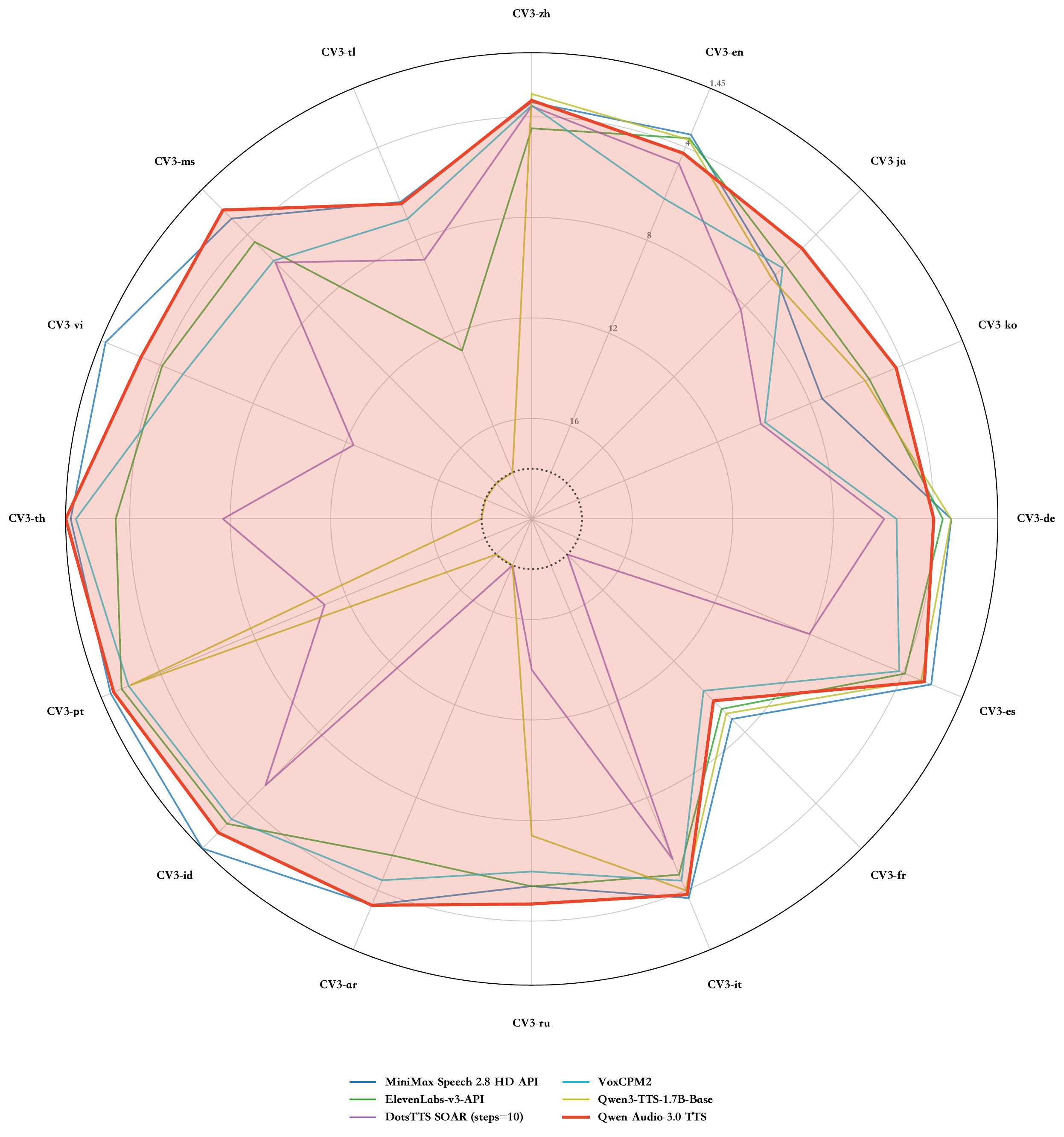
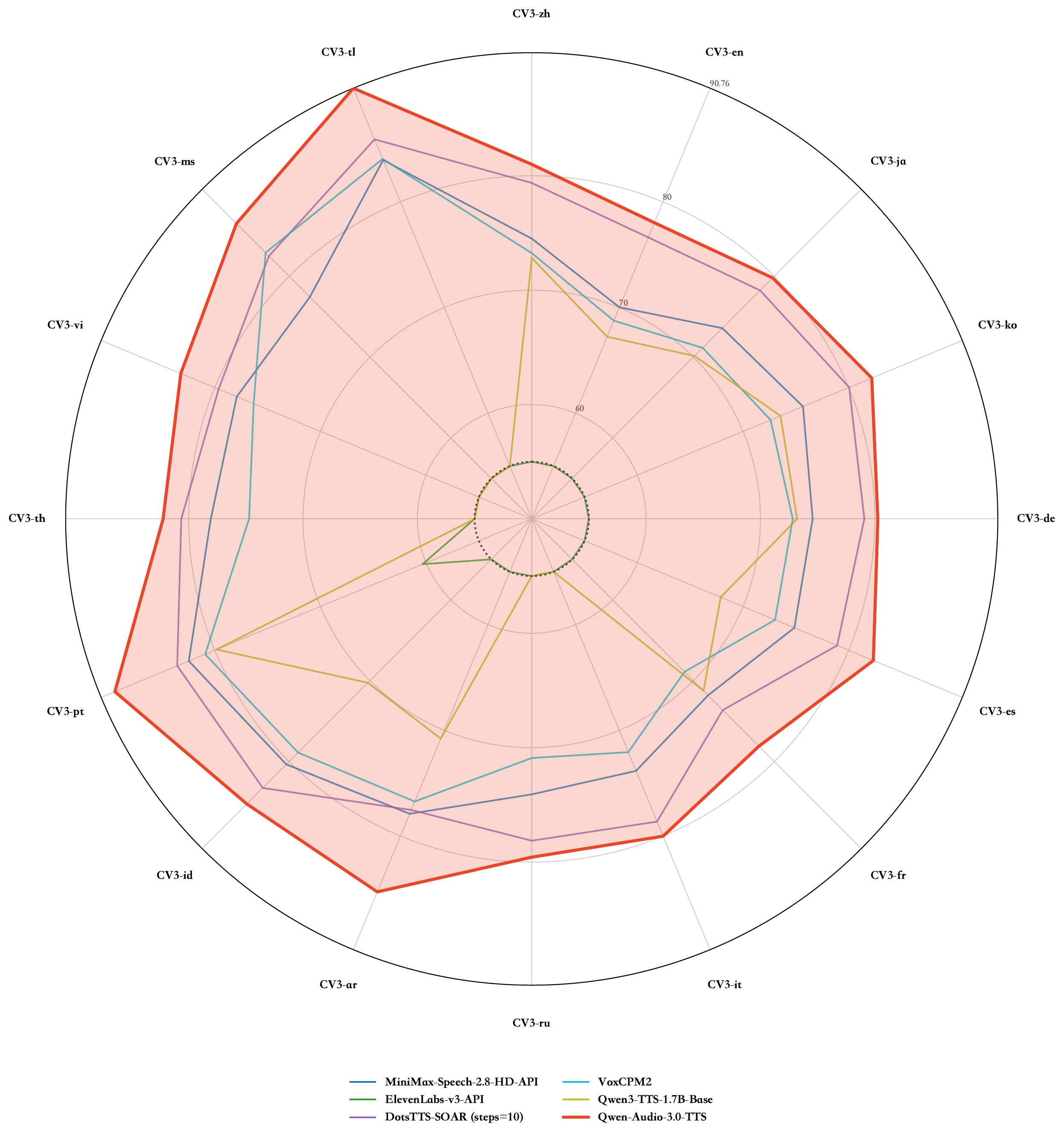
Timbre fidelity is where it pulls ahead by the widest margin — a clean sweep across all 16 languages. Pronunciation accuracy isn't a clean win: the launch page's claim is that Flash and Plus combined take the lowest word error rate in 10 of the 16 languages, with the other 6 going to rivals. Worth noting: the chart above only plots a single Qwen-Audio-3.0-TTS line without splitting Flash from Plus, so that 10-versus-6 breakdown can't actually be read off the chart itself.
How it ranks on third-party leaderboards
The two charts above are the releasing team's own benchmarks. The third-party evaluator Artificial Analysis also runs a leaderboard based on blind human pairwise comparisons, scored as Elo ratings. On its July 14 "provider's own voices" sub-leaderboard, Qwen-Audio-3.0-TTS-Plus takes first place.
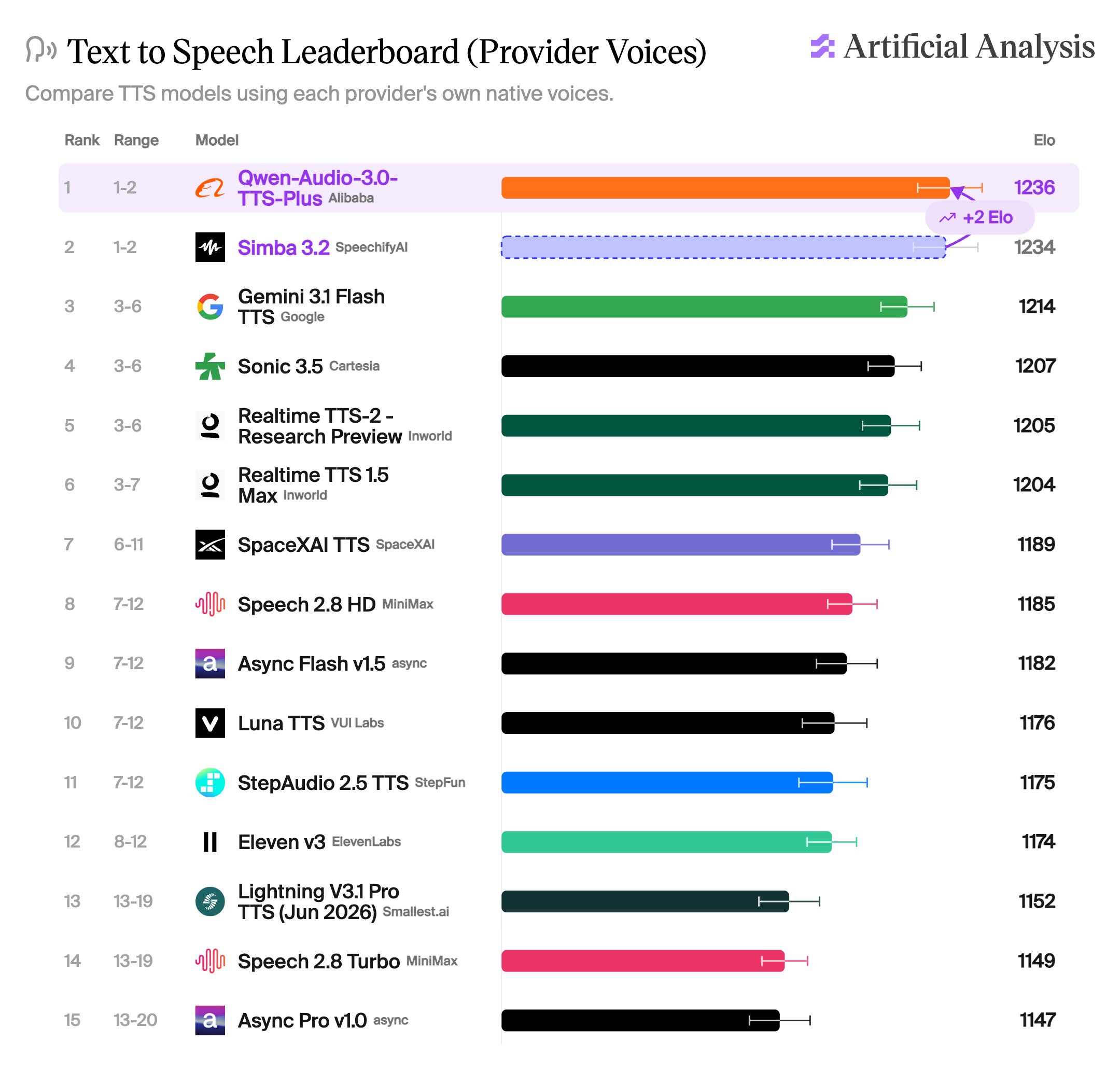
That first place needs some context: 1236 versus second-place Simba 3.2's 1234 is only a 2-point gap, and the two error bars overlap — the leaderboard itself lists both in the 1-2 rank range. Further down are Google's Gemini 3.1 Flash TTS (1214) and Cartesia's Sonic 3.5 (1207). ElevenLabs's Eleven v3 sits at 12th place with 1174.
The same leaderboard also supplies two numbers the launch page never mentions: generation speed and price.
| Model | Elo | Generation speed | Price (per million characters) |
|---|---|---|---|
| Qwen-Audio-3.0-TTS-Plus | 1236 | 16 chars/sec | $27.59 |
| Simba 3.2 (SpeechifyAI) | 1234 | 30.2 chars/sec | $10.00 |
| Gemini 3.1 Flash TTS (Google) | 1214 | 27 chars/sec | $18.31 |
| Sonic 3.5 (Cartesia) | 1207 | 120 chars/sec | $39.00 |
On generation speed it comes in dead last on this list: 16 characters per second, nearly half of Simba's, and about a seventh-and-a-half of Sonic 3.5's. On price it costs more than double Simba, about 50% more than Gemini, but roughly 30% less than Sonic 3.5. So that first-place ranking is bought with quality — it doesn't hold an edge on speed or price.
How you can actually use it right now
Access runs through Alibaba Cloud Bailian, with model names qwen-audio-3.0-tts-flash and qwen-audio-3.0-tts-plus, over a WebSocket protocol. Official sample code is provided in six languages: Python, Java, Go, C#, PHP, and Node.js.
One thing is easy to mix up. Tongyi open-sourced a full Qwen3-TTS lineup back in January, with weights on HuggingFace you can download and run locally; Qwen-Audio-3.0-TTS was not open-sourced alongside this release — searching HuggingFace for that name turns up nothing. Here's how the two generations relate:
| Qwen3-TTS | Qwen-Audio-3.0-TTS | |
|---|---|---|
| Release date | January 2026 | July 2026 |
| How to get it | Download weights from HuggingFace | API access only |
| License | Apache 2.0 | Cloud service terms |
| Sizes | 0.6B / 1.7B, two sizes | Flash / Plus, two service tiers |
| Languages | 10 | 16, plus 20 Chinese dialect regions |
| Best for | Local deployment, modifying the model, keeping data in-house | Out-of-the-box results, dialect and multilingual coverage, comfortable calling the cloud |
If you want to run it locally, what's downloadable right now is still January's lineup. Its 1.7B-CustomVoice version has already crossed 2 million downloads on HuggingFace, and the community has produced various quantized versions in GGUF, MLX, and other formats.
One step the demos earlier in this piece skip over: you can't just drop a reference clip straight into a synthesis request. To use your own voice, you first need to register the audio as a custom voice through the voice cloning feature to get a voice ID, then set voice to that ID at synthesis time. Calling it directly, voice is set to the name of a preset system voice.
voice parameter to the voice ID, and model to the matching model name.Voice cloning: from "switch languages and it becomes someone else" to one clip speaking 16 languages
Tongyi Lab releases Qwen-Audio-3.0-TTS. One page with diagrams covering what it does, how much faster it is, and where it doesn't win.
↓ One page, fully readable · includes an animated diagram
This kind of model does one job: give it text, it reads it aloud. Give it a short recording of someone speaking (called the reference audio), and it can read in that person's voice — that's voice cloning. Sounds mature already, but two things have never quite worked.
Qwen-Audio-3.0-TTS, released July 20, ships in two tiers: Flash chases speed, hitting roughly 300 milliseconds from request to first sound; Plus chases quality. One reference clip can speak across 16 languages (7 of them new, clustered around Southeast Asia and the Middle East), and it also covers 20 Chinese dialect regions, from Cantonese and Shanghainese to Gansu and Qingdao dialects. Noisy reference audio doesn't need pre-cleaning — the model trained on dirty recordings from the start, doing noise suppression and timbre preservation together.
Controlling delivery changed too. Instead of tweaking acoustic parameters, you now write tags straight into the text, and they take effect from wherever they appear:
Tweak a set of numbers you don't really understand, then listen back and try again
A plain-language instruction sets the tone for the whole passage; bracketed tags control one specific spot
Alibaba Cloud's docs publish 31 such tags (24 for delivery, 7 for sound effects), while the launch page claims 86 new ones — the gap isn't explained. These benefits only hold up if the model is fast and stable enough, which comes down to the system below.
XiaoHu recorded a short reference clip of himself speaking Chinese and wanted it to speak Japanese instead. The model's approach: chop the audio into small chunks, generate them one chunk at a time, then reconstruct the sound wave. How many chunks per second determines how many steps it has to generate — that's the master switch for speed.
Turn "characters per second" into something concrete: how long each service takes to read out a 3,000-character piece.
that?
his voice
at all
- × Switch languages, timbre drifts into someone else
- × A bit of noise or echo, and cloning falls apart
20 dialects
ships Qwen-Audio-3.0-TTS
speaks straight
into Japanese, Korean
first place across all 16 languages
Hz
chunks a second
fix mispronunciation → fix dirty reference audio →
fix timbre quality
chars/sec
the fastest rival
is 7.5x quicker
through Alibaba Cloud only. To run it
on your own machine, use January's Qwen3-TTS.