The Top PM's AI Leverage Ladder: Two Paths to Higher PM Output, Plus 3 Ready-to-Copy Prompts
An instructor who has trained 30,000+ PMs breaks down two AI leverage ladders — from copy-paste to end-to-end delivery, from web prototypes to production PRs.
- Colin Matthews splits the ways product managers use AI into three ladders — personal leverage, product leverage, and system leverage — each with three rungs. Climb a rung and AI does more of the work while you review less.
- Personal leverage: Rung 1, AI only drafts text you copy-paste manually; Rung 2, AI produces finished artifacts like financial models; Rung 3, AI connects to real tools like PostHog and runs an entire task end to end.
- Product leverage: Rung 1, web prototyping tools quickly validate ideas but the code is throwaway; Rung 2, Claude Code / Codex prototype directly against the real codebase; Rung 3, an agent submits a production PR ready to merge.
- Key rungs come with the author's actual prompts, quoted verbatim — a cost-comparison model, a PostHog retention analysis, a codebase built specifically for prototyping — all copy-ready.
- The third ladder, system leverage, is only defined at the start; the body of the piece fully develops personal leverage and product leverage but never breaks system leverage into three rungs.
PMs Climb Three Separate Ladders With AI
Lenny's Newsletter published a guest post on June 30, 2026 by Colin Matthews, a longtime product leader and serial entrepreneur who has independently launched 10+ SaaS products. The piece was written to coincide with the launch of a PM course he built with Lenny.
Colin Matthews maps how product managers use AI onto three ladders — personal leverage, product leverage, system leverage — each climbing from Rung 1 to Rung 3. The higher you climb, the more of the work AI finishes for you, and the less you need to review by hand.
Why it matters: the author has trained over 30,000 product managers, with client teams from OpenAI, Google, Stripe, Figma, and Microsoft, and has independently launched 10+ SaaS products himself. This is stuff he's actually run — every rung comes with the prompt he used.
Each ladder handles a different job: personal leverage helps you clear your own to-do list; product leverage helps you ship the right thing faster; system leverage turns your AI habits into repeatable steps that reliably produce quality results. The matrix below is the article's skeleton — columns are the three rungs, rows are the three ladders.
Assist
Delegate
Full Ownership
Leverage
Leverage
Leverage
The author has one important caveat about this ladder: not everything needs to climb to the top rung. Which rung fits depends on how deep AI use makes sense for the task in front of you. Below is the original framework diagram from his article.
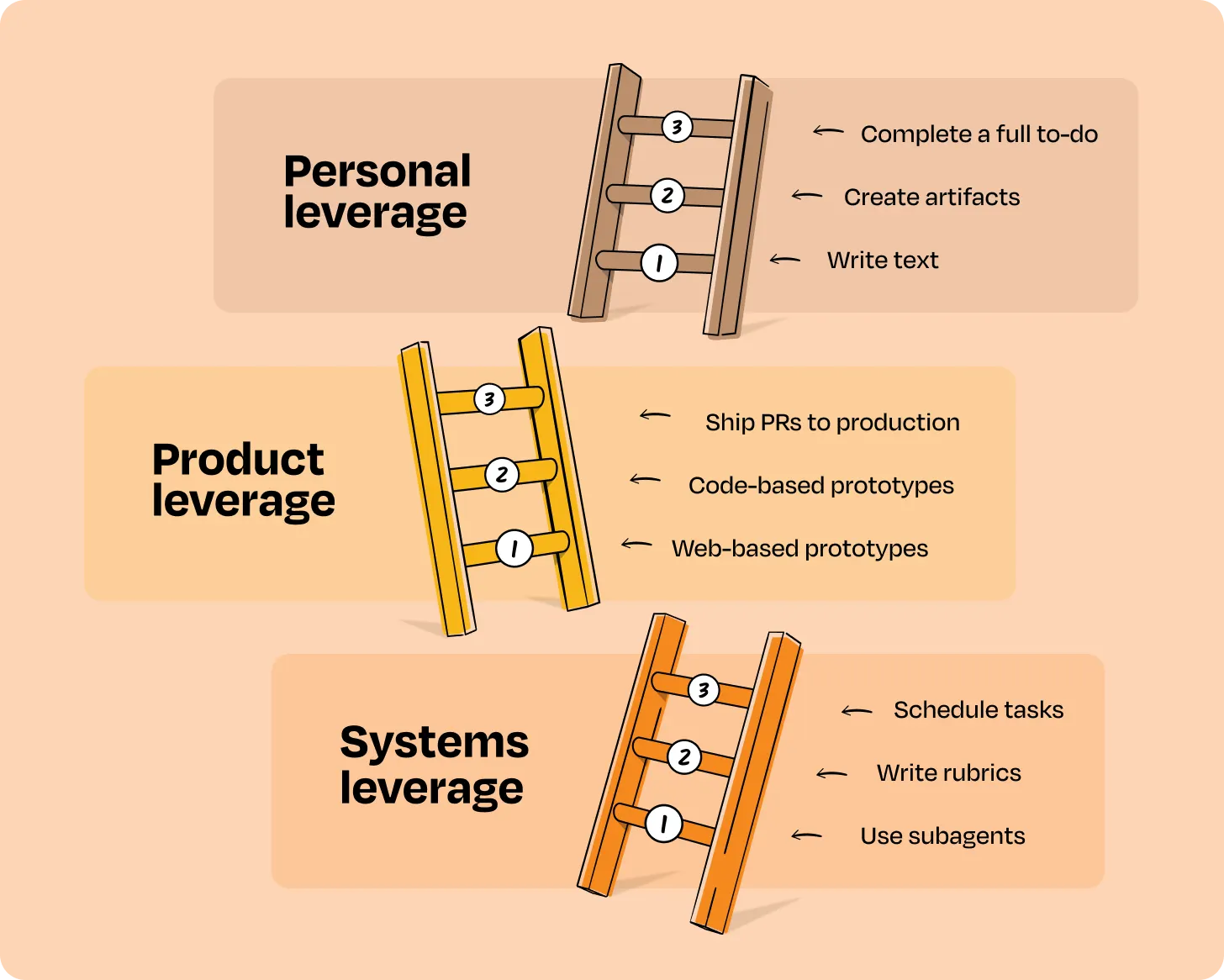
It's a ruler that measures how deep your AI use goes on a given type of work. Rung 1: AI assists, you still do the work yourself. Rung 2: you hand off the task, AI produces the result, you review it. Rung 3: AI completes the whole thing across multiple steps and checks its own results. The higher you climb, the more time you free up.
From Drafting for You to Handing You a Finished Artifact
Personal leverage is the most common use case of all: writing documents, doing research, building small artifacts. The difference between Rung 1 and Rung 2 comes down to one sentence: at Rung 1, AI gives you text and you still copy-paste and organize it yourself; at Rung 2, AI hands you something directly usable.
Rung 1: AI Writes the Text
You ask AI to help write a PRD, a Jira ticket, or an email, then copy-paste the answer into another tool. Most people stop here. The author's example is asking Claude to help draft a PRD — the AI has almost no context on your company or what makes a "good PRD," so you go back and forth until it's "good enough," then paste it into Google Docs or Word to polish before sending it to the team.

Rung 2: AI Produces the Artifact Directly
At this rung, AI actually "does the work" and produces a real artifact — slides, an Excel model, a small prototype. The author's example is asking Claude to build a cost-comparison model: self-hosting and building an agent yourself, versus using a managed service like Vercel, and what each would cost. Here's the exact prompt he used — copy it and adapt it to your own scenario.
Create a model that represents costs if we build and host ourselves vs. using managed agents. Do research on the engineering time saved and the compute costs in self-hosted vs. managed. Look at other vendors, like Cloudflare, Vercel, or E2B that provide sandboxes for agents for pricing. Demonstrate both the cost of the pilot and the cost at scale in the model, assuming we have 5M+ agent instances running annually (where an agent instance is per hour).
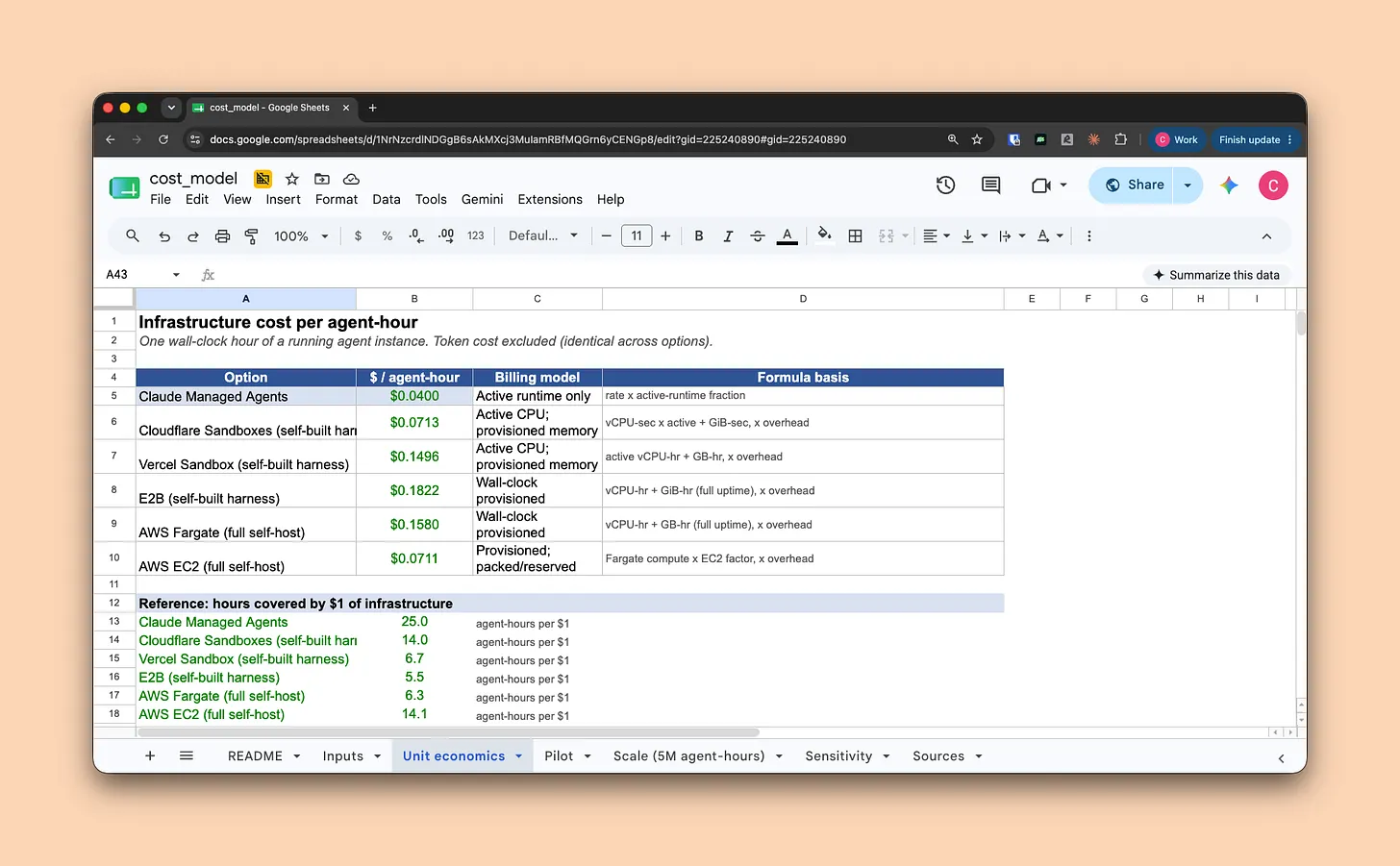
The author's caveat: output at this rung still needs heavy editing, but it's a step beyond "copy AI's text into another document" — AI hands you an artifact now, not just text waiting to be edited.
Connect AI to Real Tools and Let It Finish the Whole Task Itself
This is the top of personal leverage, and the first key point in the whole piece: connect AI to the tools you actually use via MCP, and it can go fetch data and pull materials on its own — finishing end to end a task you'd previously have handed to a colleague. The one move that matters: connect AI to your real tools.
It's a standard interface that lets AI read and write data in external tools directly. Before, you had to manually copy-paste data from PostHog or design files from Figma and feed them to AI. With MCP installed, it can go open the door and get the data itself. It's like giving AI a master key — you stop being the courier.
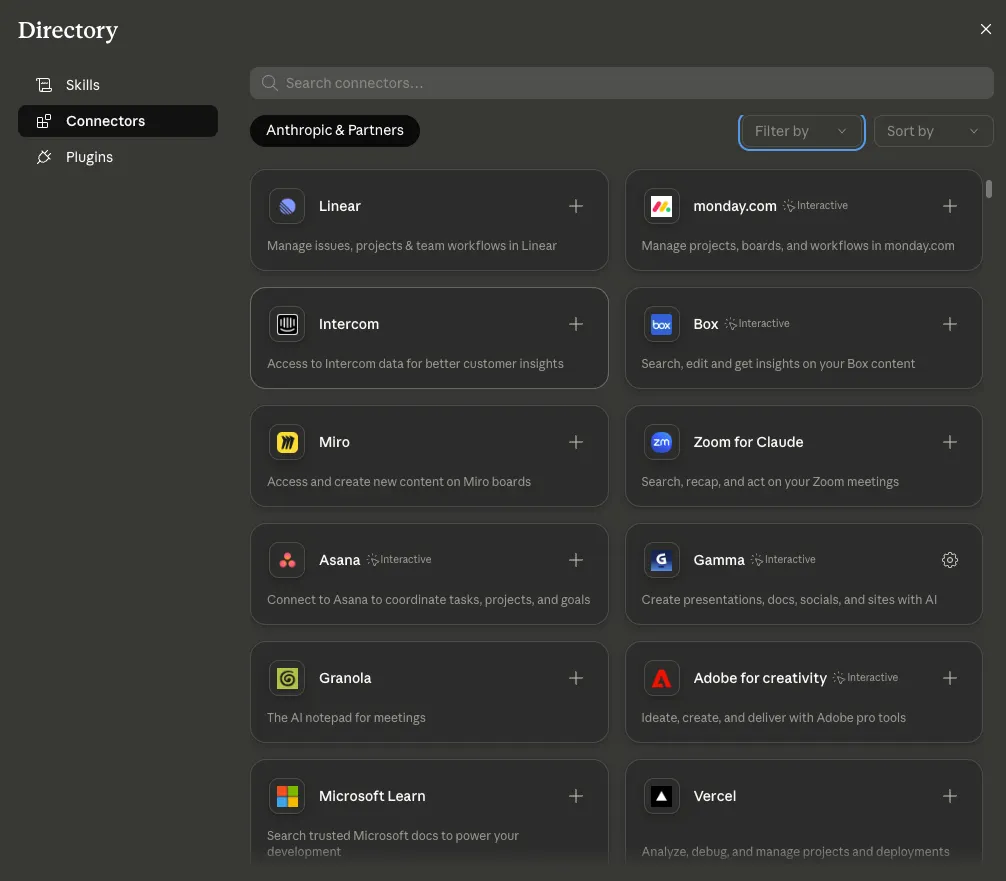
How to connect: Claude Code, Codex, and Cursor can all connect via MCP to tools like Figma, Amplitude, PostHog, and Pendo. Just go to your product's connector marketplace and add the tool (Claude, ChatGPT, Gemini) — set it up once and it works forever, no need to touch it again.
Figma · Notion
Example: Connect Claude to PostHog and Run a Full Retention Analysis
The author uses a fictional product, Stride (a Strava clone fitness app), as an example. He wants to run a retention analysis: do users who used the social-sharing feature have higher 30-day retention than those who didn't? He connected Claude to PostHog, the product analytics tool, and had it run the whole analysis and report from a single prompt.
This used to be the kind of task you'd squeeze in between two meetings. Now the whole thing is handled end to end by AI, and the output is still an HTML report with cited data sources — click the link and you land back in PostHog to verify the raw data.
Use PostHog to check if users who use social share features have a higher 30d retention than those who don't. Show me an html doc as a final output visualizing cohorts and any other useful data. Cite all your sources so I can validate.
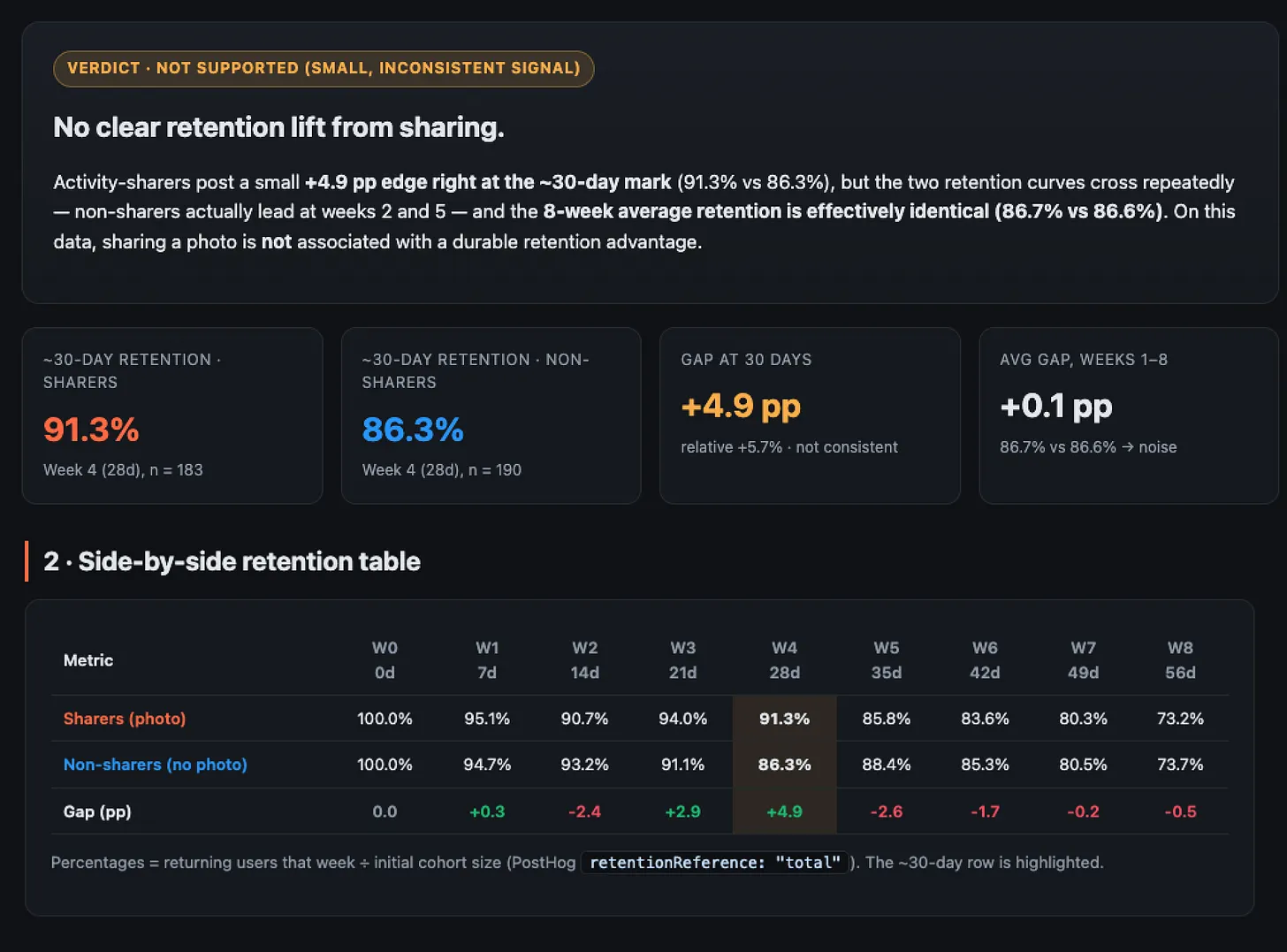
The author stresses that the line cite your sources in the prompt matters a lot: with it, you can easily verify whether the result is correct. In this example, Claude gave direct links back to the raw PostHog data.
Once You Have Access, Start With These
Once your tools are connected, the author suggests picking one everyday task to practice on. Below are four high-leverage tasks he lists as ready to try immediately, reproduced as given.
- Analyzing how a launch went by reviewing recent customer tickets and online sentiment
- Checking how many users actually use a feature through product analytics events
- Summarizing a recording from a customer call and creating a prototype based on their feedback
- Updating your next sprint based on a change in roadmap priorities
Results will probably disappoint you at first — that's just because the model doesn't know your standards yet. Keep iterating with it until you're satisfied, then, in that same conversation, have AI turn the process into a locked-in skill you can reuse with one click next time. This workflow can give you a decent first draft of almost anything: PRDs, roadmaps, marketing materials, research analyses, prototypes, Figma files.
Personal Leverage's Three Rungs — What Actually Changes in the Output
- Text waiting for your edits, still needs copy-pasting elsewhere
- A finished artifact (like a financial model), but needs heavy revision
- A complete retention analysis report with cited data sources, run automatically
Web Prototypes Validate Ideas Fast, But the Code Is Throwaway
Product leverage is about the gap between "what you want to build" and "what you can ship." Rung 1 uses web prototyping tools (Lovable, Replit, Magic Patterns) to build a prototype quickly — it communicates your idea better than a document, but it has one hard limit: the generated code has nothing to do with your product's actual codebase.
Back to the Stride example. Here's its current profile page — users keep complaining that the unsubscribe path is unclear, and once the free trial ends, they can't tell what their subscription status even is.
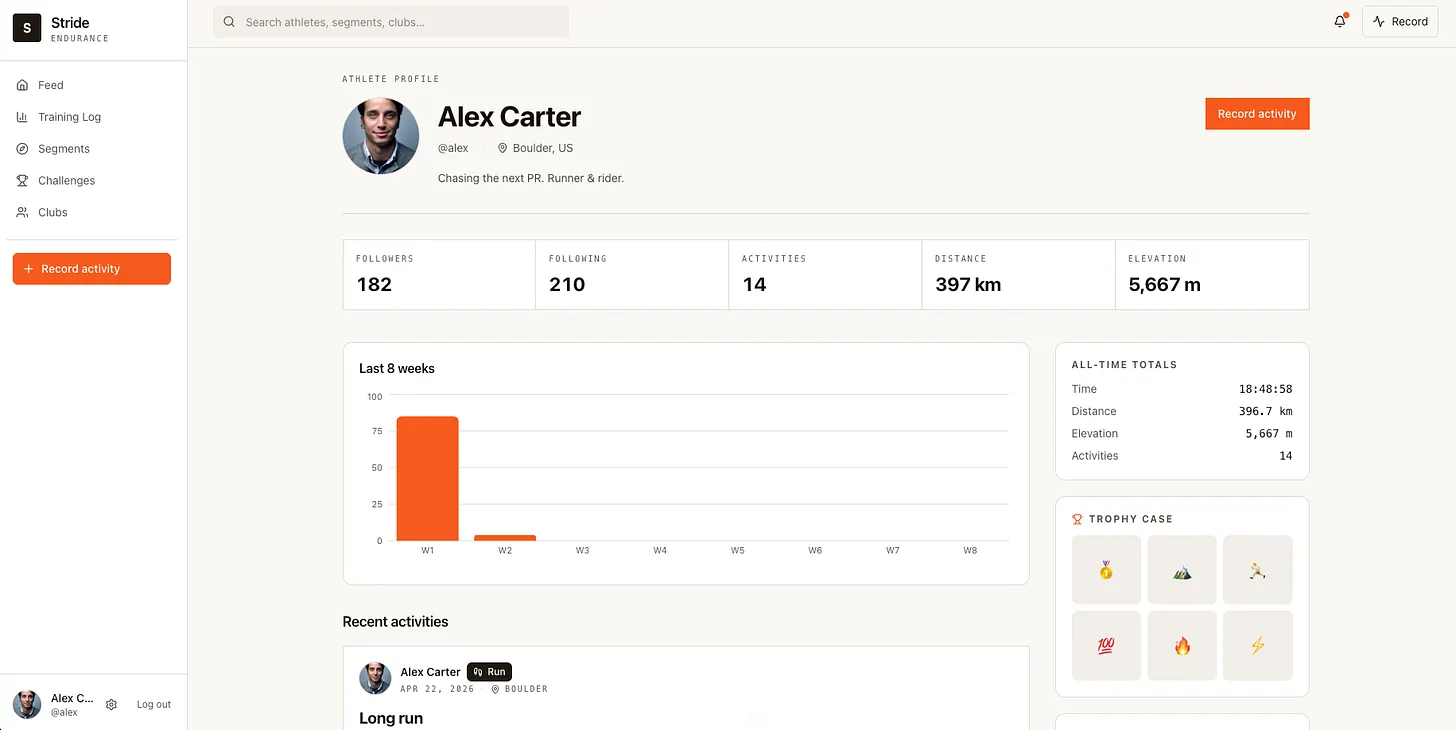
You can use an AI web prototyping tool to quickly mock up a change and test whether your proposed fix solves the problem with users and stakeholders. The GIF below shows an unsubscribe flow built with a web prototyping tool.

- Communicate ideas more directly than a document
- Quickly demo concepts to stakeholders, users, and internal teams
- Validate faster whether the approach works and actually solves the problem
- The underlying code has no standalone value
- Almost no context on real components, pages, or data models
- After testing, engineers still have to rewrite it as real code
Web prototyping tools have limited awareness of your real components and data model, so what they produce is pretty far from reality — turning a tested prototype into real code still takes extra work. Which brings us to the next rung.
Let AI Edit Directly in Your Real Codebase
Rung 2 is the second key point in the piece: use Claude Code or Codex to read your product's real codebase directly and prototype against it, instead of relying on screenshots or elaborate prompts. The generated interface uses real components and follows your real design system, putting it much closer to shippable code.
A web prototyping tool generates standalone code that has no relationship to your real codebase — engineers still have to rewrite it after testing. A codebase prototype is Claude Code / Codex editing directly on top of your product's existing code, using real components and real styles — what you end up testing is much closer to usable code.
Same Stride unsubscribe example, but this time Claude Code / Codex builds it using the existing codebase. The change is added directly to the real settings page, reuses real components, and follows the product's own design system. The GIF below shows the codebase prototype in action.
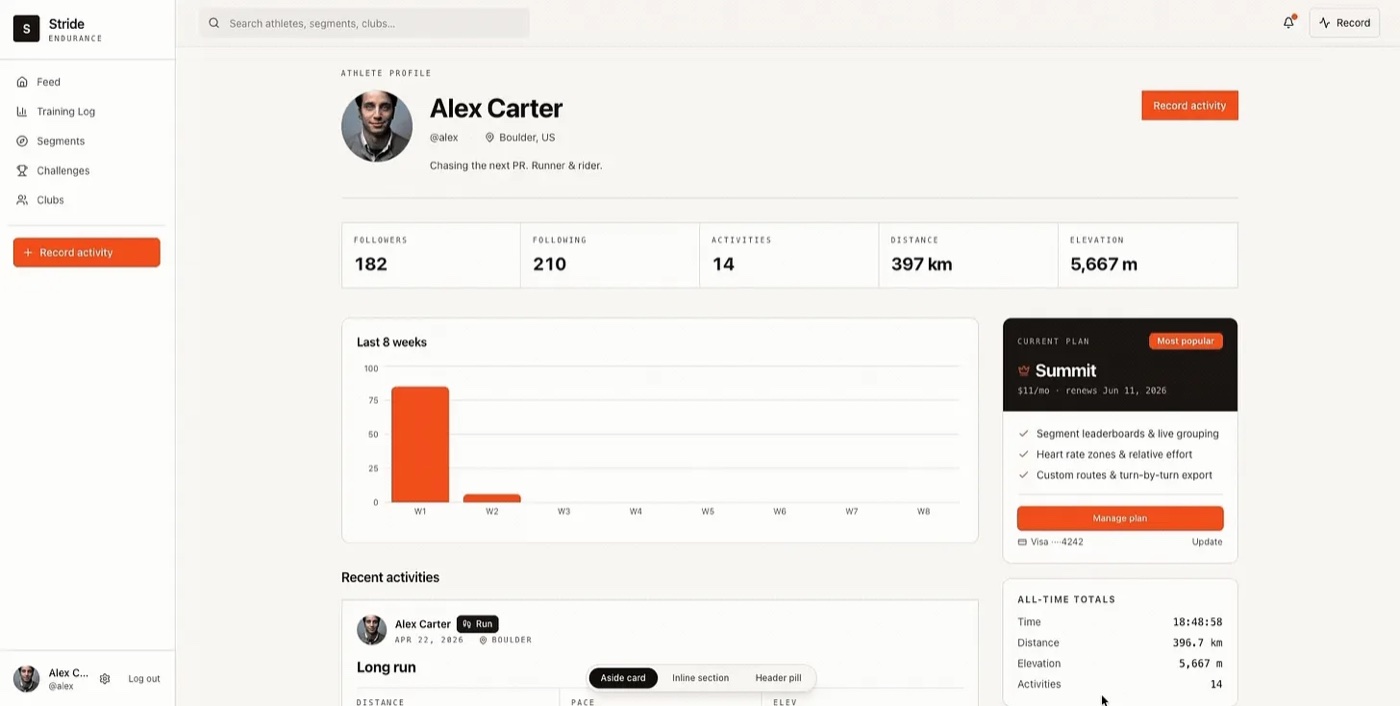
This rung doesn't require running the whole product on your laptop or expert-level coding skills, but it does take some technical grounding: first, being able to use Claude Code or Codex to write code and run an app; second, you need a codebase that contains only the UI, without the full backend. Where does that codebase come from? Have an engineer run the prompt below against the main codebase for you.
Create a new repo that contains all of the base UI elements, styles, routes, pages, and components for [list parts of the product you want included]. Create a mock data store that mimics the API data model and is stored locally. I should be able to run the resulting repo without any environment variables or backend services.
Once it's built, clone the new repo to your machine and you'll have a version of the UI that's easy to run and can't accidentally harm the real product. Engineers will sometimes say this is more work than a single prompt, but prototyping against your real styles and components is worth the effort — the author's advice is to find a way past that hurdle.
Let an Agent Turn Changes Into a Mergeable PR
The top of product leverage is letting an agent submit code straight to production: an engineer picks up the PR, reviews it, and merges it into the product. This rung tests a PM's technical judgment the most — you need to know which changes are safe to let AI submit as a PR directly, and which ones you should back off from.
The author's example: a billing change might only touch the UI, with the backend endpoints, data, and events already in place — that's a good fit for submitting a PR directly. But it might also require building new infrastructure or integrating with another team's system — in which case you shouldn't touch it yourself. Here's how he draws the line.
| Good fit for AI to submit a PR directly | Back off and hand it to engineering |
|---|---|
| Copy changes | Changes that need new infrastructure |
| Small UI/UX tweaks | Changes that require integrating with other teams to ship |
| View changes that reuse existing backend logic | Changes that touch backend endpoints, data models, or events |
As a PM, there's no point spending your time being a worse engineer than the engineers on your team. Knowing when to write a doc, when to build a prototype, and when to submit a PR matters just as much as being able to execute any of those tasks.
As a PM, there's no point in spending your time being a worse engineer than everyone else on your team.Colin Matthews / Lenny's Newsletter
The Third Ladder — Only a Name in the Original Piece
The framework defines three ladders at the start, and the third is system leverage: turning your AI habits into repeatable steps so you can consistently outsource work to AI and get high-quality results. But unlike the first two, the body of the article never breaks it into three rungs with worked examples.
The author drops a hint about it back in the personal-leverage section: an early draft might not be perfect yet, "we'll come back to that when we talk about system leverage." By the end of the article, this ladder stays purely conceptual — that's as far as the source material goes. It reads more like a direction the author's course or a future article might expand on; we're reporting that honestly here rather than filling in the gap for him.
Something You Can Do Today
Rather than getting hung up on the whole framework, just take one action. First figure out which rung you're on for each ladder, then pick one move you haven't tried yet.
- Using the 3×3 matrix above, mark which rung you're currently on for personal leverage and for product leverage.
- Go to a connector marketplace (Claude / ChatGPT / Gemini) and connect one tool you use often, like PostHog or Notion — set up once, works forever.
- Pick one task from the checklist in Section 3 to practice, like "find out how many users are actually using a feature."
- If you're not happy with the result, keep iterating on the prompt; once you are, have AI summarize the process into a skill in that same conversation, locking it in as a reusable step.
Which rung fits depends on how deep AI use makes sense for the task in front of you.Colin Matthews / Lenny's Newsletter