Claude Code's Official Take on Loop Design: 4 Levels from Manual Approval to Unattended
- The Anthropic Claude Code team published a blog post breaking down "designing loops" into 4 standard patterns: turn-based, goal-based (
/goal), time-based (/loopand/schedule), and proactive — progressing from low to high autonomy. - The official definition of a loop: an agent repeatedly executes rounds of work until some stop condition is met. The four types are distinguished along four dimensions: who triggers it, how it decides to stop, which feature implements it, and what tasks it fits.
- The core mechanism of
/goalis bringing in a separate evaluator model to judge whether the bar has been met — Claude itself is not allowed to decide "good enough, I'm done" on its own, and you can also cap the maximum number of attempts. - Proactive loops stack five features together —
/schedule(timed trigger),/goal(stop condition), skills (verification standard), dynamic workflows (multi-agent parallel orchestration), and auto mode (no manual approval needed) — to handle ongoing work like bug-report triage, issue classification, and dependency upgrades without anyone watching. - Two practical tips: use scripts for deterministic work — it's cheaper in tokens than having Claude re-derive the same steps every time; and for large-scale dynamic workflows (which can spin up hundreds of agents), do a small-scale test run before going wide.
90-point score and "hundreds of agents" are all taken directly from the source and reflect the official framing.AI Does the Work — But Who Decides It's "Done"?
Delba de Oliveira and Michael Segner of the Claude Code team published a post on Anthropic's official blog on June 30, 2026, systematically laying out how to design "loops" for Claude Code — having the agent repeat work until a stop condition is met.
The authors open with an observation: on X, everyone's talking about "stop prompting coding agents one line at a time — design a loop instead," but if you actually go look for what a "loop" even is, you get a pile of conflicting answers. This piece sets out to clear that up.
Below, we break down the 4 tiers of loops from simplest to most complex — each one should map onto some kind of work you already deal with.
First, What Exactly Is a "Loop"
The official definition is one sentence: a loop is an agent repeatedly executing rounds of work until some stop condition is met. The key distinction is that "when it's considered done" is decided in advance and handed off to the system to judge — it's not you nudging it round after round yourself.
The authors classify loops along four dimensions, and these four dimensions form the shared reference frame for everything that follows: who triggers it, how it decides it should stop, which Claude Code feature it's implemented with, and what tasks it's best suited for. Set up the coordinate system first, then slot each of the four loop types into it.
A single prompt → manual, real-time → on a schedule (fixed interval) → event or schedule, with no one present at all
Claude decides on its own → meets the bar or hits the retry cap → you cancel it or the work runs out → each task exits when it meets its bar, and you shut down the whole pipeline manually
Default conversation → /goal → /loop, /schedule → all of the above + dynamic workflows + auto mode
Short tasks → tasks with verifiable exit criteria → recurring tasks or ones tied to external systems → recurring workflows with a clear definition
The authors also note: not every task needs a complex loop — start with the simplest approach, and pick these patterns up only as needed.
You Ask, It Does One Round
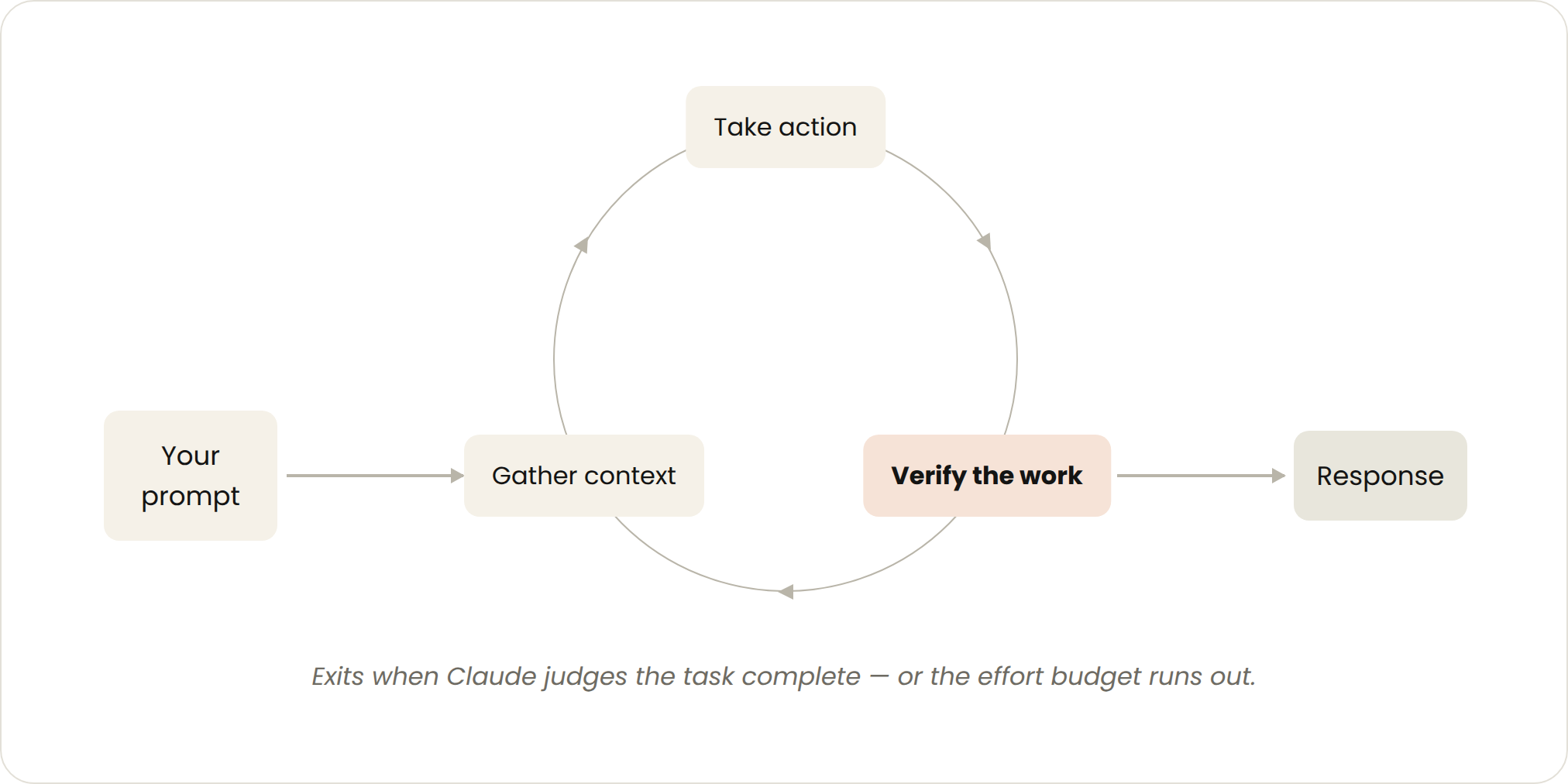
This is the default mode you use every day. Every prompt you send kicks off a loop where you personally guide each round: Claude gathers context, makes the change, checks its own work, repeats if needed, and reports back. The official term for this is the "agentic loop."
An example from the source: you ask Claude to build a like button. It reads your code, edits the files, runs the tests, and hands back something it believes works. From there, you manually review it and write the next prompt. The trigger is a single prompt, the decision to stop rests with Claude itself, and it's suited to short tasks that aren't part of a fixed process or schedule.
Making Its Self-Checks More Thorough
You can strengthen the "verification" step by writing your usual manual review steps into a SKILL.md, so Claude can check more end-to-end on its own. The key is giving it tools or connectors it can see, measure, and act on — the more quantifiable the checks, the easier it is for Claude to self-verify, and the fewer rounds it needs.
The source gives a verify-frontend-change skill example: for any frontend change, it's not allowed to declare victory just because the edit succeeded — it has to go through the same process a human reviewer would.
- Start the dev server and open the changed page in the browser
- Interact with the change directly: click the button, confirm the state change, take before/after screenshots
- Check the browser console: no new errors or warnings allowed
- Run a performance trace with Chrome DevTools MCP and audit Core Web Vitals
If any step fails, fix it and rerun from step 1 — never hand back partially finished work.
View the original SKILL.md sample code
---
name: verify-frontend-change
description: Verify any UI change end-to-end before declaring it done.
---

# Verifying frontend changes
Never report a UI change as complete based on a successful edit alone.
Verify it the way a human reviewer would:

1. Start the dev server and open the edited page in the browser.
2. Interact with the change directly. For a new control (button,
   input, toggle): click it, confirm the expected state change,
   and screenshot before/after.
3. Check the browser console: zero new errors or warnings.
4. Use the Chrome Devtools MCP, run a performance trace and audit
   Core Web Vitals.

If any step fails, fix the issue and rerun from step 1 — do
not hand back partially verified work.
Set the "Passing Bar" First, Then It's Allowed to Stop
Sometimes one round isn't enough, especially for complex tasks. Agents perform better when they can iterate repeatedly. You can use /goal to clearly define "what counts as done" and extend the time Claude spends iterating.
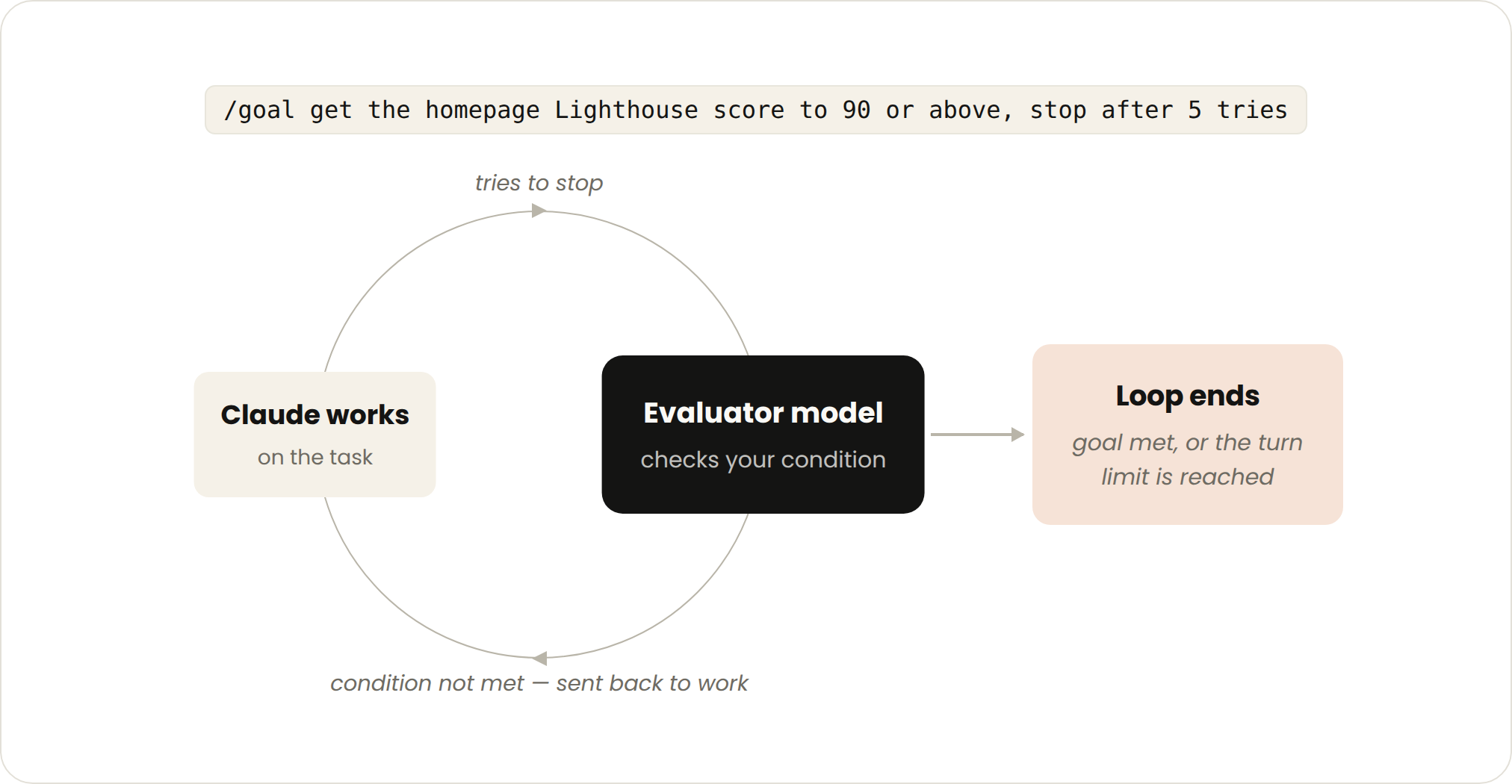
Once you've defined success criteria, Claude no longer has to judge for itself whether something is "good enough" and quit early. Every time Claude wants to stop, a separate evaluator model checks its work against your criteria — if it doesn't meet the bar, it gets sent back to keep working, and this continues until the goal is met or the retry cap you set is reached.
In other words, the decision-making power is taken out of Claude's hands and given to an evaluator model dedicated to checking against the standard. This is also why "deterministic criteria" work especially well — things like a number of passing tests, or clearing a score threshold — an evaluator model can check these off cleanly, with no ambiguity.
Like a QC checkpoint before submitting work: the inspector doesn't grade their own work — a different person (the evaluator model) checks it item by item against a standards sheet, sends it back if it falls short, up to a capped number of retries.
A concrete example:
/goal get the homepage Lighthouse score to 90 or above, stop after 5 tries.
Goal-based loops fit tasks with verifiable exit criteria; what you hand off is a "stop condition," implemented via /goal. To manage cost: make both the completion criteria and the retry cap concrete — e.g., "stop after 5 tries."
Check In on a Schedule
Some work is recurring: the task stays the same, only the input changes — like summarizing Slack messages every morning. Other work depends on an external system, and the simplest way to hook into it is to check at a fixed interval and react to whatever changed — a PR, for instance, might get review comments or its CI might break.
This kind of work is triggered with /loop, which reruns a prompt at a fixed interval. The stop condition is either you canceling it, or the work being done (the PR merged, the queue empty). Example:
/loop 5m check my PR, address review comments, and fix failing CI
Reruns the same prompt at a fixed interval on your own machine.
Turn off your computer, it stops. Good for work you're present for and watching temporarily.
Use /schedule to create a routine that moves this "rerun on a timer" setup to run persistently in the cloud.
Turn off your computer, it keeps running. Good for work that needs to stay running long-term, independent of whether you're around.
/loop 5m checks the PR every 5 minutes, addresses review comments, fixes failing CIStack Five Features Together and It Runs Itself, Unattended
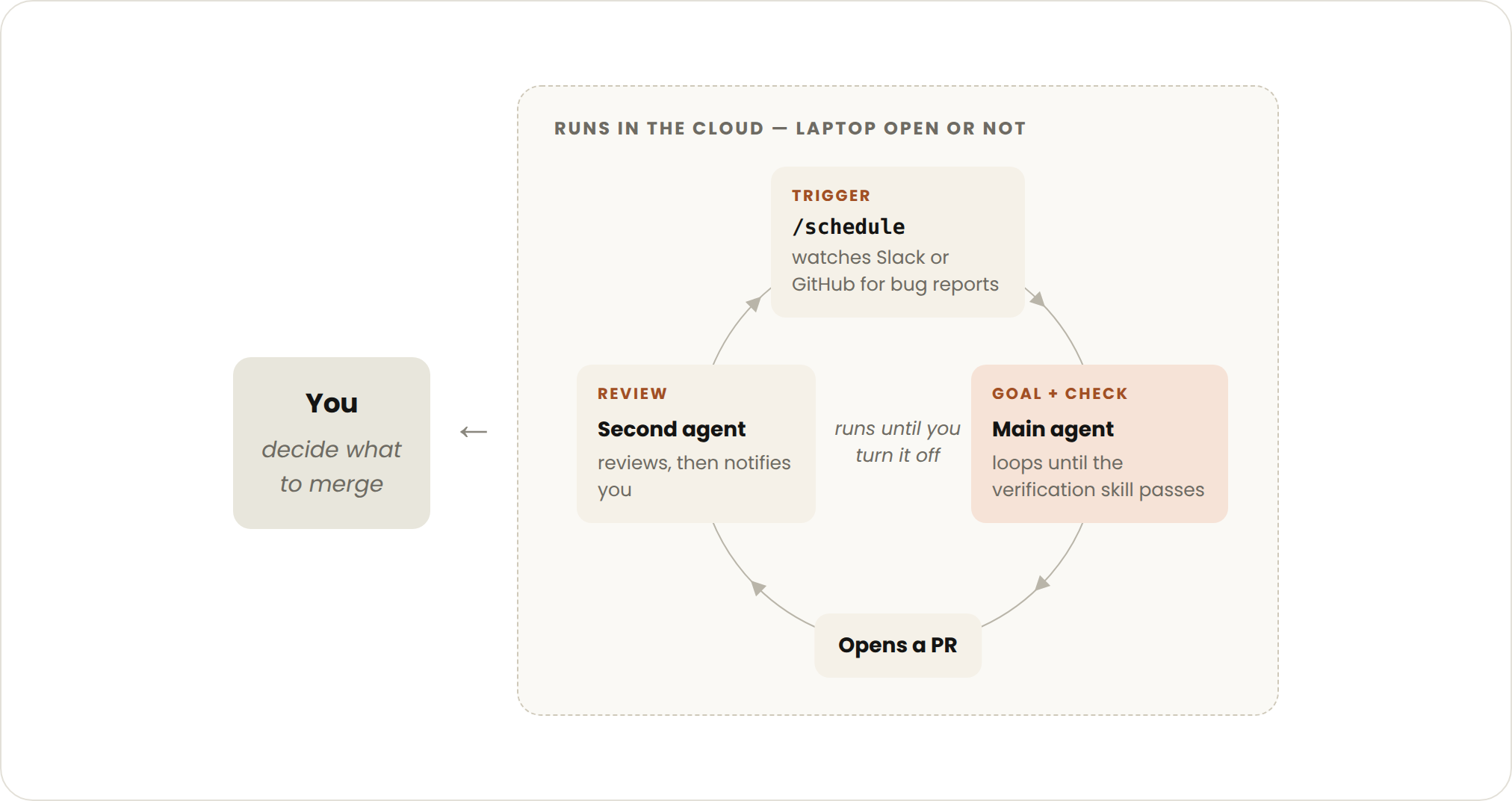
On top of the primitives above, adding auto mode (no need to stop and ask you at every step) and dynamic workflows (research preview) lets you combine them into a loop that handles long-running work. It's triggered by an event or schedule, with no one present in real time at all.
The stop logic of a proactive loop has two layers: each individual task exits once it hits its own goal, while the routine itself keeps running until you manually shut it down. It's best suited to recurring, clearly defined workflows: bug reports, issue triage, migrations, dependency upgrades, and so on.
Take handling feedback as an example — the official approach is to stack four features layer by layer, then wrap the whole thing in auto mode:
Put it all together, and a full prompt looks like this:
/schedule every hour: check #project-feedback for bug reports.
/goal: don't stop until every report found this run is triaged,
actioned, and responded to. When fixing a bug, use a workflow to
explore three solutions in parallel worktrees and have a judge
adversarially review them.
In plain terms: every hour, check the #project-feedback channel for bug reports; don't stop until every report found in this run is triaged, actioned, and responded to; when fixing a given bug, use a workflow that tries three solutions in parallel across three separate worktrees, then has a judge agent adversarially pick apart each one. Here, dynamic workflows can spin up on the order of hundreds of sub-agents in a single run, working in parallel and coordinating with each other.
To manage cost: hand the routine off to smaller, faster models, and reserve the strongest model only for the key decision points that need it.
Don't Let the Loop Drift Off Course
The quality of a loop's output depends on the system around it. When designing that system, the source gives four principles:
- Keep the codebase itself clean
Claude follows the patterns and conventions already in your codebase — the cleaner the foundation, the cleaner what it produces will be.
- Give Claude a way to self-check
Codify "what counts as good" into skills that reflect your and your team's standards, so it can check itself end-to-end.
- Keep documentation within reach
Framework and library docs carry the latest best practices — don't make it guess from stale memory.
- Use a second agent for code review
A reviewer with a completely fresh context has fewer biases and isn't influenced by the main agent's reasoning. You can use the built-in
/code-review, or hook into GitHub's Code Review.
When a given run falls short, don't just stop at fixing that one instance. Try to codify it into a rule that improves the whole system, so every future iteration benefits. When something goes wrong, what you should fix is the system's rules, not just that one result.
Don't Let a Loop Quietly Burn Through Your Tokens
To keep tokens in check, a loop needs clear boundaries. The source gives an actionable checklist of six items:
/usage breaks down recent usage by skills, subagents, and MCP; /goal with no arguments shows rounds and tokens used so far; /workflows shows per-agent usage and lets you stop any of them at any time.Which Loop to Pick — One Table Explains It
Facing a specific task, you need to be clear on three things: what you're handing off, when to use it, and which feature to use. This summary table from the source lines up the four tiers row by row for comparison — click each card to see a concrete example.
| Loop | You hand off | When to use it | What you use |
|---|---|---|---|
| Turn-based | "A check" | You're exploring or making decisions | Custom verification skills |
| Goal-based | "A stop condition" | You know what counts as done | /goal |
| Time-based | "A trigger" | Work happens outside the project, on a schedule | /loop, /schedule |
| Proactive | "A prompt" | Work recurs and is clearly defined | All of the above + dynamic workflows |
Turn-based · See example
Ask Claude to build a like button: it reads the code, edits the files, runs tests, and hands back a version it believes works; you review it manually before writing the next prompt.
Goal-based · See example
/goal get the homepage Lighthouse score to 90 or above, stop after 5 tries.
Time-based · See example
/loop 5m check my PR, address review comments, and fix failing CI
Proactive · See example
/schedule every hour: check #project-feedback for bug reports.
/goal: don't stop until every report found this run is triaged,
actioned, and responded to. When fixing a bug, use a workflow to
explore three solutions in parallel worktrees and have a judge
adversarially review them.
Look at work you're already doing, pick a task where you're the bottleneck, and ask yourself what part can be handed off:
- Can you write a verification check for this?
- Is the goal here clear enough?
- Does this work run on a schedule?
Once you have an idea, get the loop running, watch where it gets stuck or goes off track, and then iterate on it freely.
We define a loop as: an agent repeatedly executing rounds of work until some stop condition is met. Claude Code team, Getting started with loops, 2026-06-30