Google Ships Nano Banana 2 Lite and the Omni Flash Video Model: 4-Second Image Gen, the Fastest and Cheapest in the Line
- Google has released Nano Banana 2 Lite (model codename gemini-3.1-flash-lite-image), currently the fastest and cheapest image-generation model in the Nano Banana line: one image in 4 seconds, $0.034 per 1K images.
- Google is opening the Gemini Omni Flash video model (gemini-omni-flash-preview) to developers for the first time, with video generation and conversational editing from mixed text, image, and video input, priced at $0.10 per second of video — the same as Veo 3.1 Fast.
- The two models can be chained: generate an image with Nano Banana 2 Lite, then hand it to Omni Flash to turn it into a moving video, keeping session context via the Interactions API, with up to 3 rounds of edits stacked in a row.
- Nano Banana 2 Lite is live across AI Studio, the Gemini API, and Gemini Enterprise Agent Platform, plus consumer products like Search AI Mode, the Gemini App, NotebookLM, and Google Photos.
- Omni Flash currently generates only 10-second videos, does not yet support uploading audio references or scene extension, and character consistency across cut shots is still unstable.
Google Dropped Two New Models at Once
On June 30, 2026, Google announced it was opening two new models to developers: the image-generation model Nano Banana 2 Lite, and the video generation / editing model Gemini Omni Flash.
One Official GIF Shows Just How Much Faster and Cheaper
This official benchmark GIF puts price on the x-axis and latency on the y-axis; the further toward the lower-left Nano Banana 2 Lite sits, the faster and cheaper it is.

Google adds that although speed is the headline, Nano Banana 2 Lite still holds a usable level on prompt adherence, character consistency, and the clarity of text in images — it isn't trading quality for speed.
Nano Banana Now Has Four Tiers — Which One to Use
With Lite added, Nano Banana now has four tiers. They aren't a simple high/mid/low ladder — they split by trade-offs among speed, quality, and control. Get each one's positioning clear before you pick.
| Tier | Model Codename | Positioning |
|---|---|---|
| Nano Banana 2 Lite | Gemini 3.1 Flash Lite Image | Speed-first. Tuned for near-real-time, high-throughput batch scenarios, with latency pushed to the minimum |
| Nano Banana 2 | Gemini 3.1 Flash Image | General workhorse. High quality at lower latency, the best balance of performance and cost |
| Nano Banana Pro | Gemini 3 Pro Image | Professional, complex scenes. Strongest control and reasoning, for work where accuracy matters more than speed |
| Nano Banana (original) | Gemini 2.5 Flash Image | The legacy model Google flags as old; it recommends upgrading to Lite for gains in quality, speed, and cost |
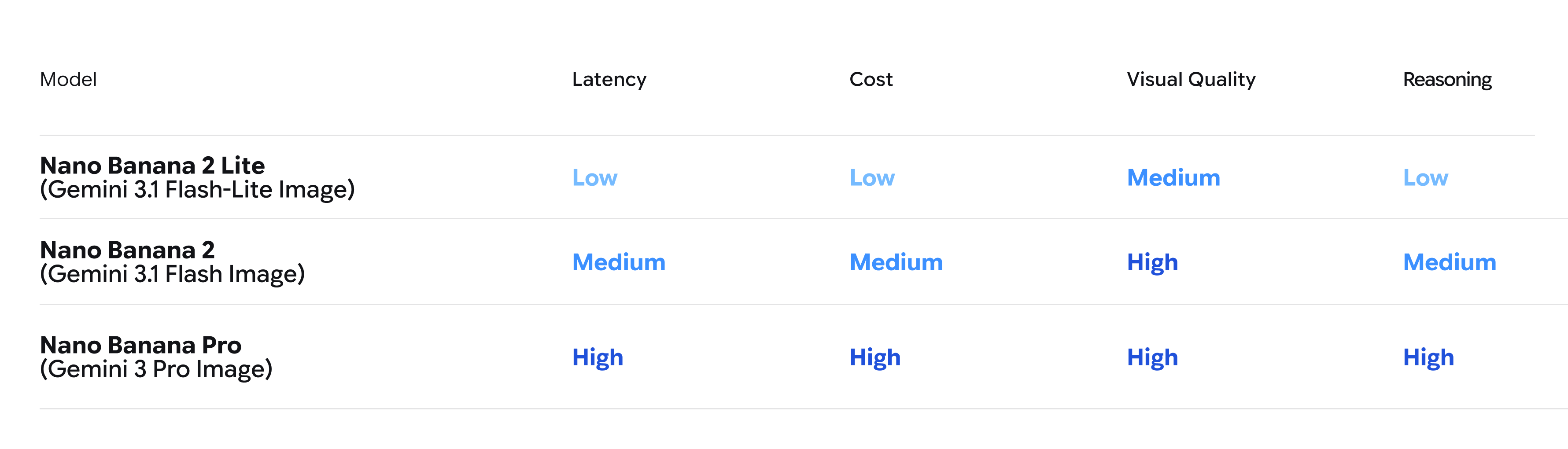
Lite isn't a stripped-down version — it's Google's recommended replacement for users on the original Nano Banana. The post states plainly that "you can swap it out now for immediate benefits across key performance dimensions" — in other words, upgrading from the original to Lite is the default move Google is suggesting.
A Video Model You Can Finally "Edit by Conversation"
Omni Flash is a model Google showed off at I/O; this is the first time it's been handed to developers via API. It wires Gemini's multimodal understanding together with video generation and editing, so it can revise video while listening to natural-language instructions. Google highlights four capabilities — let's take them one at a time.
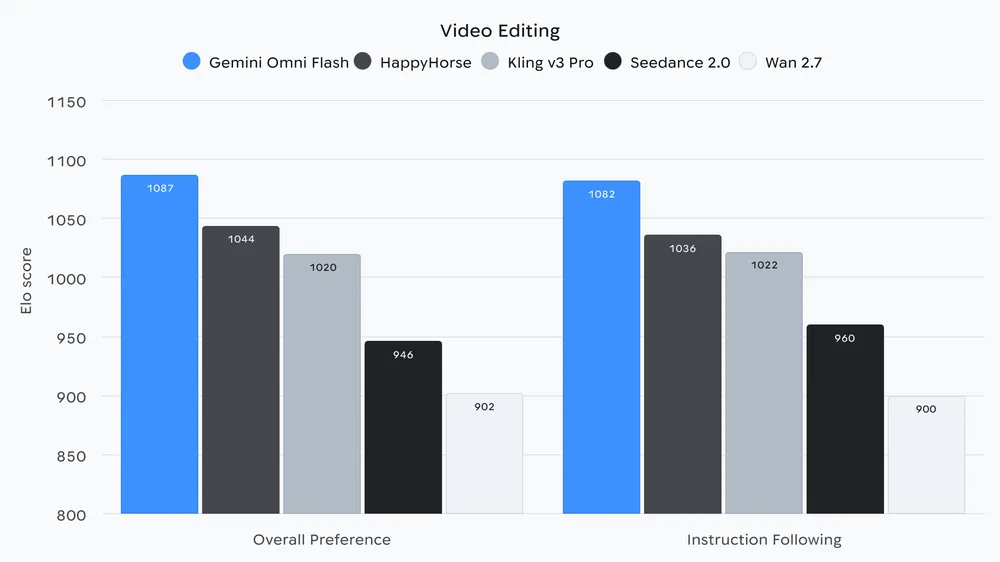
You used to need two separate systems for "generate a video" and "then edit it." Omni Flash puts generation and conversational editing in one model: you give an instruction in a single sentence and it keeps revising on the already-generated clip, no need to rewrite the full prompt.
After generating a video, you don't rewrite the full prompt — you just revise the already-generated clip with a single natural-language instruction.
At generation time you can feed images, text, and video all at once as reference material, keeping character looks and scene details consistent throughout.
Omni draws on the history, biology, narrative logic, and other knowledge Gemini holds, so the on-screen content is coherent and the story hangs together.
With a simple prompt, you can map text and graphics directly onto the action's timing in the video.
It's like chatting with an editor who has already watched the footage: you say one line, they revise to match — no need to restate the request from the top each time. That's the difference between "conversational editing" and the old "rewrite the prompt for every change."
How the Two Models Connect
Google says the real payoff is chaining the two models into one pipeline: use Nano Banana 2 Lite to generate an image fast, pass that image to Omni Flash as a reference to bring it to life as video, then use the Interactions API to remember the context and keep revising conversationally.
The key here is the multi-turn session context of the Interactions API: the model remembers which image and which video clip it generated in earlier rounds, so you can revise step by step like a chat, stacking up to 3 rounds in a row without rewriting the prompt each time.
It's like Photoshop's history: you say "add a filter to this one," and the model knows you mean the image just now — no need to point it out again. Three rounds of edits is how far back this history can reach — three steps.
Google Ships Three Demos You Can Play With Directly
These three demo apps are the concrete realization of that pipeline, and all can be tweaked and used right in AI Studio.
What This Means for People Building Products
Put those capabilities into practice, and this launch actually unlocks three kinds of scenarios.
One: image-gen cost drops to about $0.034 per 1K images (roughly ¥0.24) at 4 seconds each. Product prototypes that batch-generate images and iterate quickly can run on a much smaller budget, and the marginal cost of trial and error gets very low.
Two: video generation plus conversational editing opens directly via API for the first time. Developers no longer have to bolt together a "generation model" and an "editing tool" themselves — a single API both generates and edits.
Three: image-to-video can be called as a chain. Generate an image first, turn it into video, then keep editing for up to 3 rounds — this gives rise to interactive apps like decor makeovers, landmark tours, and e-commerce showcase videos, and Google's three demos are the templates.
What It Can't Do Yet
Omni Flash is currently a public preview, and Google lists a few limits of its own. Know the boundaries before diving in — don't set your expectations too high.
- A single video generation is capped at 10 seconds; Google says longer durations are coming soon.
- In the Gemini API, this model does not yet support uploading audio references, nor scene extension.
- Video references under 3 seconds fit the API schema, but the model can't handle them for now.
- Character consistency still has limits when cutting shots or panning the camera; Google says it's improving.
By the way: watermarking and content provenance
How the New Prices Stack Up Against Peers
Let's close with the hard numbers. Nano Banana 2 Lite lands as "the fastest and cheapest in the line," and Omni Flash lands "at the same price as Veo 3.1 Fast" — these two are the sharpest pricing signals of this launch.
Per-Second Video Pricing: Omni Flash on Par with Veo 3.1 Fast
In other words, Google priced this first-time-open video model at exactly the same per-second rate as the existing Veo 3.1 Fast. On the image side, Nano Banana 2 Lite is the fastest, cheapest tier Google explicitly names and recommends original-Nano-Banana users swap straight in for.
It's our recommended replacement for developers currently using our first version of Nano Banana, you can swap it out now for immediate benefits across key performance dimensions. Google's official blog, 2026-06-30