LM Studio launches Bionic: a Codex for open-source models, and you decide whether it runs locally or in the cloud
- LM Studio has launched Bionic, an AI agent built for open-source models — a standalone new app, separate from the original LM Studio.
- It actually gets things done: Work projects handle research, writing, and document tasks, while Code projects search files, edit code, and run commands right in your local codebase.
- Its signature move: you choose where the model runs — locally (free, data stays on-device), in the cloud for frontier open models (zero data retention by default), or via LM Link, borrowing another computer's model over your local network.
- It supports real-time local voice transcription — speech converts to text entirely on-device, and no audio ever gets uploaded.
- Local and LM Link models are free with no billing setup required; only cloud models draw down credits based on usage. The preview is out today for Mac and Windows.
LM Studio just built an assistant that actually gets to work
LM Studio, the local large-model tool, has just released Bionic — an AI agent built specifically for open-source models.
For the past few years, LM Studio has been the first thing anyone running open-source models on their own machine installs. It wrapped up the hassle of downloading models and running local inference into one easy-to-use desktop app. But it always felt more like a chat window bolted onto a model manager — you could talk to a model, but you couldn't really count on it to carry a real task through from start to finish.
Getting AI to really do your work used to mean picking a side
Getting an AI assistant that could actually roll up its sleeves used to mean facing an unavoidable trade-off.
Say you want AI to read through a stack of research notes and write up a comparison, or hunt down a timeout bug in a project's codebase and fix it. For it to actually read your files and edit your code, it needs access to that material first. The most capable assistants today process that material by shipping it off to the vendor's cloud. The work gets done beautifully, but your contracts, code, and recordings all pass through someone else's servers along the way.
The other route is running an open-source model locally yourself. Privacy is preserved, but these tools mostly stop at chat — you ask, it answers, and when it actually needs to touch files, run a string of commands, and save the results, it usually falls short.
Great at heavy lifting and effective, but your files, code, and voice have to be uploaded to the vendor's cloud to be processed.
Your data stays on your own machine and privacy holds up, but most can only chat — they can't carry out a full real task.
Bionic wants to have it both ways: doing real work while letting you decide whether your data ever leaves the device.
Two project types: one for documents, one for code
Bionic splits work into two project types, and you pick whichever fits the task at hand.
- Create and edit documents, slides, and PDFs
- Drag files and folders in as reference material
- Everything it generates is filed under the project and saved automatically
- Comes with file, search, Git, and command-line tools built in
- Can dig through the whole repo and edit multiple files at once
- Runs commands locally and shows you a diff before any change is kept
Within a single project you can open several independent sessions, each working its own task, and you can run multiple projects at once to push several jobs forward in parallel. Any files it generates or changes land in the project's shared file area, visible to every session in that project. In code projects, when it runs commands or edits files, it shows you the diff and command output first and lets you decide whether to keep the change.
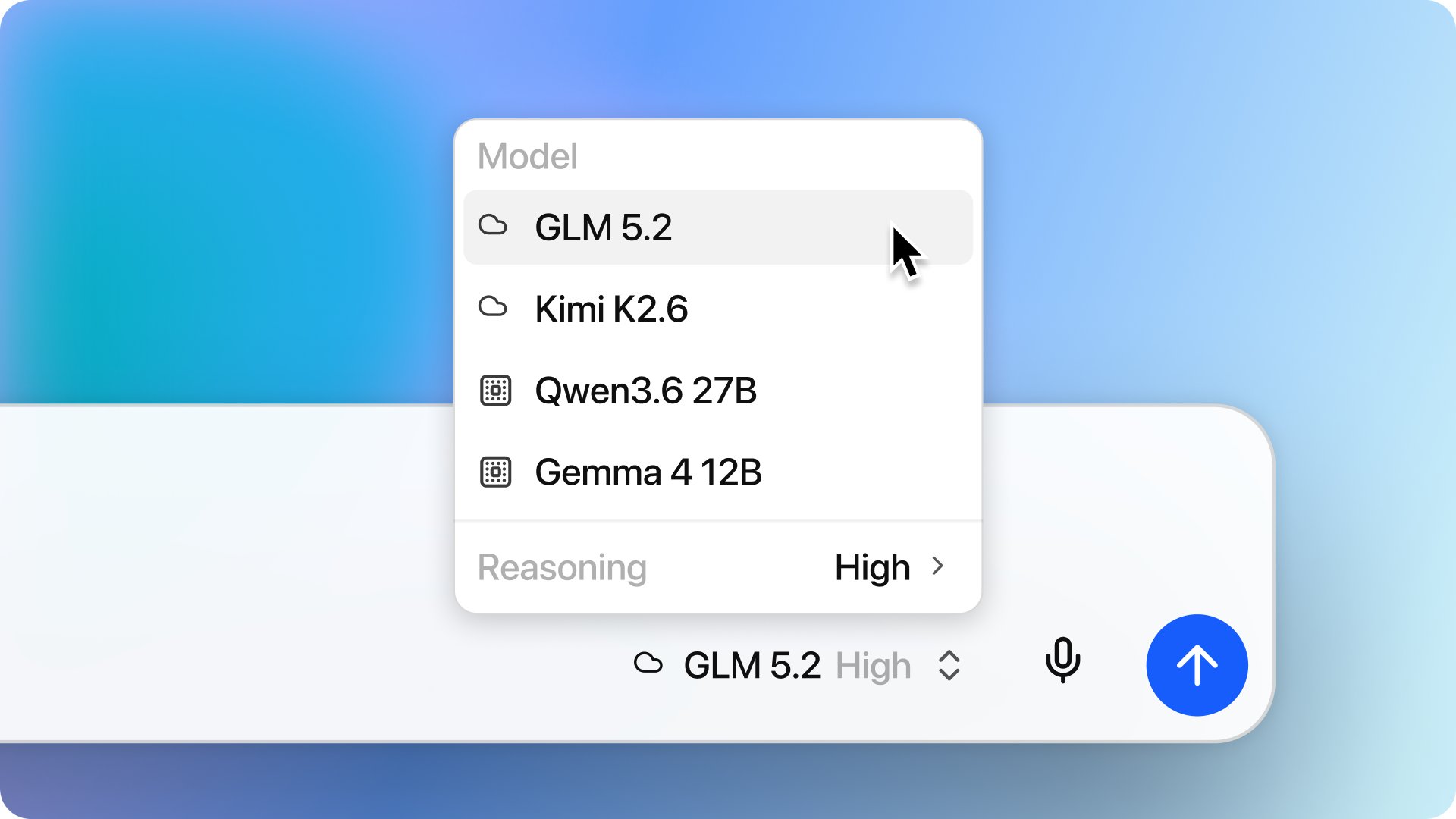
Where the model runs is entirely up to you
This is where Bionic diverges most from other AI assistants: for the same task, you get to decide where the model behind it actually runs.
Every Bionic session has three possible destinations, and privacy and cost split along those same three paths.
Two of the three routes are completely free and never let your data leave your own turf: local models use your own machine's compute, and LM Link uses another machine's compute on your LAN. Only when you need the strongest frontier open models for the heaviest jobs do you take the paid cloud route — and even that one defaults to zero data retention. Privacy and cost both come broken down into options you can see at a glance and switch between at will.
Before going further, two new terms here are worth defining.
ZDR stands for Zero Data Retention. It means whatever you send to the cloud server gets discarded the instant the model finishes processing it — no copy of your data sits on the server. Cloud inference servers are all located in the US, and this policy is on by default across the board.
LM Link lets Bionic borrow a model running on another computer on your local network. Say your desktop at home has a beefy GPU in it and your laptop doesn't have enough horsepower — the laptop connects over and uses the desktop's model instead. Both the model and the data stay within your own devices; nothing leaves the house. This route is free, just like running locally, and it doesn't draw down credits.
Talk to it, and the words never leave your computer
Beyond typing, Bionic can listen too. It comes with local real-time voice transcription — talk to it naturally, and what you say gets converted to text on the fly.
What matters is where the processing happens: your voice and audio get transcribed entirely on-device and never leave your computer. It's the same logic as typing to a local model — keeping the most private slice of your data on your own side.

Still built on LM Studio, now available for Mac and Windows
Running open models smoothly on your own machine comes down to the inference stack Bionic is built on — technology LM Studio has spent a long time refining.
To be clear: Bionic is a standalone new app, separate from the original LM Studio. If you still want to dig into the more advanced, low-level configuration, the original LM Studio keeps working right alongside Bionic.
Does it cost money?
Local models and LM Link remote models are both free — no credits drawn, no billing setup required upfront. Credits only get deducted when a session uses a cloud model, and how much depends on the model you picked and how much text got processed. Accounts come in Personal and Organization (team) flavors. There's no published flat per-task price yet — you just see cumulative usage on the usage page.
AI that works for you — from "your files have to go to the cloud" to "you decide: local or cloud"
LM Studio built a working assistant called Bionic: it edits documents, it edits code, running locally is free with data staying put, and the preview lands today on Mac and Windows — all explained on one page, with a diagram.
↓ One page, done · includes an animated diagram
LM Studio is usually the first thing anyone running open models on their own machine installs — it wraps up the hassle of downloading models and local compute into one easy-to-use desktop app.
But it's always felt more like a chat window bolted onto a model manager: you can talk to the model, but you can't really count on it to carry a real task through from start to finish.
✘ Can't handle a full real task — digging through files, editing code, running commands, saving results
It's good at "getting a model running," but basically stops at chat; ask it to actually carry out a whole task and it usually comes up short.
Bionic is a standalone new app separate from LM Studio, upgrading it from a "chat tool" into an assistant that actually gets its hands dirty. And what it's solving is a trade-off that used to be unavoidable.
Getting AI to actually do work used to mean picking one side or the other: use a cloud assistant and the work gets done beautifully, but your files, code, and recordings all have to go to the vendor's servers first; use a local tool and your privacy holds up, but most can only chat — they can't do real work.
Either upload your material to the vendor's cloud to get real work done, or use a local tool to protect your privacy but only get chat. Pick one.
Both at once: real work gets done, and you decide whether your data leaves home. Work splits into two types — Work projects handle document research, Code projects handle local codebases.
→ Bionic digs through the repo · edits multiple files · runs commands, then shows you a diff before you decide whether to keep it
It can also listen to you talk, converting speech to text locally in real time, with audio never leaving your computer. So how does it pull off both "getting real work done" and "keeping you in charge of your data"? The key is in the diagram below.
This is where Bionic differs most from other AI assistants: for the same task, you choose where the model runs, and privacy and cost split along those same three paths.
The average person doesn't have much feel for "it can run three kinds of models," but they definitely have a feel for whether it costs money. Bionic's math is simple: everyday tasks cost nothing, and only the heavy jobs that call on the strongest models get billed.
- ✕ Go cloud: great results, but every file gets uploaded
- ✕ Stay local: privacy's safe, but all it does is chat
and you decide if data leaves home
data stays home
deleted after use · paid
data stays in your hands
no cost, no billing setup