Google ships the gemma-trainer skill: let AI fine-tune your own Gemma on your own machine
- Google added a skill called gemma-trainer to its open-source gemma-skills repo, built to teach AI assistants how to fine-tune Gemma models locally on your own machine.
- It's essentially a playbook written for AI agents to read (
SKILL.md), plus 5 ready-made Python scripts. You describe what you want in plain language, and the assistant picks parameters and runs the training. - It covers three training paths: SFT for teaching new knowledge, DPO for tuning style preferences, and RM for training a scoring model — each with its data format and key parameters locked in.
- It defaults to Unsloth, which Unsloth claims cuts VRAM use by up to 70% and runs 2x faster — enough for a single consumer GPU to fine-tune 12B models or larger, including image and audio training.
- Once trained, models can be converted to lightweight formats like GGUF and run on phones and IoT devices via LiteRT-LM.
Fine-tune a Gemma that only speaks your niche, on your own machine
You want a model of your own — one that knows the jargon of your obscure field, matches your tone, and only handles your specific job. Open Gemma was built for exactly this kind of customization, but actually fine-tuning it has always meant wading through a maze of environment setup and unreadable guides first.
Google's Gemma team recently smoothed out that first step: a new skill called gemma-trainer, added to the open-source gemma-skills repo.
github.com/google-gemma/gemma-skills
It's essentially a playbook written for AI
gemma-trainer's core is a SKILL.md file plus 5 ready-made Python script templates. It's not an app, and it's not a training library you're meant to call directly yourself.
SKILL.md is a blueprint written specifically for AI agents to read. It locks down the best practices for local fine-tuning — what value each parameter should take, which pitfalls to avoid — all in one place. Once your assistant has read it, it goes from "roughly knowing how fine-tuning works" to "knowing exactly which script to adjust on this machine, and which knob to turn to what setting." The 5 scripts in the repo each handle one job: one runs supervised fine-tuning, one runs preference alignment, one trains a scoring model, one validates data formatting, and one handles data distillation.
gemma-trainer
sets parameters
and iterates
The skill isn't tied to any particular AI tool — it works with anything from Gemini to Claude, and also works with Google's own Antigravity CLI tool (agy). Setup is a one-liner: copy the gemma-trainer folder into your AI assistant's skills directory, and it immediately knows how to guide you.
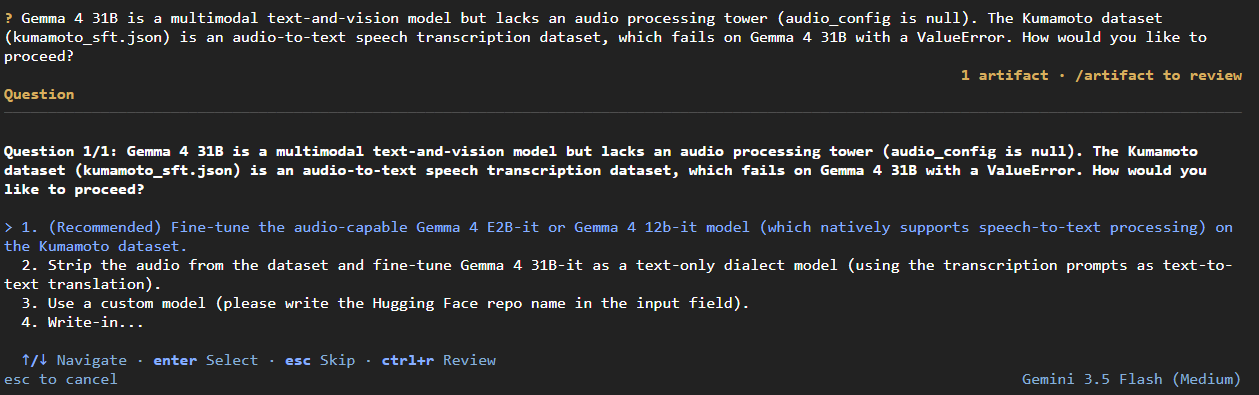
What's more interesting is that the assistant doesn't just blindly execute — it also catches your mistakes based on the capability constraints written into the skill. One real example: a training request accidentally specified Gemma 4 31B for an audio task, and the assistant flagged it on the spot, pointing out that 31B only handles text and images and has no audio capability, suggesting E2B or 12B instead.