OpenAI launches Presence: managing enterprise AI Agents after go-live is now a product
- Presence is how enterprises deploy and manage trustworthy AI Agents: answer questions, handle tasks, connect to company systems, run approved actions, and escalate to a person when needed
- Each deployment does one job type (billing, claims, employee IT, and so on); below, we walk a duplicate-subscription-charge support case through permissions, policy, simulation, and change approval
- Before go-live, you can batch-simulate; after go-live, Codex only proposes edits—new versions must be compared to production and approved by a human
- Live channels today: real-time voice and text chat; limited access via forward-deployed engineers; pricing not disclosed
Enterprise Agents stall after go-live
On July 22, 2026, OpenAI launched Presence, an enterprise product.
A quick definition. An Agent here is an AI assistant a company puts into real operations: it answers questions, handles work, uses internal systems under company authorization, runs already-approved actions, and hands off to a person when it cannot finish or the risk is high. It can face customers (billing, claims) or internal staff (for example IT tickets). Presence is meant to help enterprises install that kind of assistant into the business—and keep it governable and changeable once it is live.
Every Presence deployment starts from a concrete role: billing disputes, insurance claims, employee IT requests. The assistant only gets the knowledge and system access that role needs. The company defines what it may do, when a human must approve, and when it must escalate.
Over the past two or three years, many companies have tried something similar. Plug a model into a conference-room demo, rehearse a few "Hi, I need to check my order" turns, and it sounds almost right. Launches and internal pilots often stop there: the chat is smooth, the tone is human, and everyone concludes "AI can talk."
Once the assistant hits real work, the bar changes. People want the job done—refund the double charge—not another polite script. It has to connect to order and billing systems and follow policy. When rules change, will it freestyle? If permissions are too broad, will it touch accounts it should not? Did anyone pressure-test it on hard real tickets before go-live? When production breaks, who fixes it—and could the fix make things worse? Presence is aimed at that whole stack of problems that "it can chat" never solved. Below we unpack the capabilities with a "duplicate subscription charge" support walkthrough; the case is a path, not the product's full scope. Dialogue entry points open first with real-time voice and text chat.
Customers want "refund the double charge," not another polite script. The Agent has to connect to order and billing systems and execute under policy. Model only, no systems or rules, and you still have a chatbot.
Too much access and the Agent may change accounts it should not; too little and it cannot look up orders or issue refunds, so everything escalates. Presence's approach: each role only gets the knowledge and interfaces that job needs.
A few ideal demo dialogues will not survive real support: angry callers, repeat contacts, policy edges, fraud scripts. Before go-live, Presence can batch-run simulated tickets and grade outcomes, policy, tools, and whether escalation was correct.
Refund policy changes, new products ship, user language shifts—the Agent has to follow. Presence does not let the Agent rewrite its own production self: the coding assistant Codex proposes edits; the team compares the candidate to the running version; a human approves before it ships.
Follow a double-charge call to see how Presence works
The product is general: deploy Agents by role, connect systems, enforce policy, finish work, escalate when needed. To make that concrete, we walk one sample case from the product UI. Role: support. Channels: phone and text. Fictional retailer Swiftcart; the customer says a subscription was charged twice. From understanding the ask through refund, step by step—what Presence relies on in a real session.
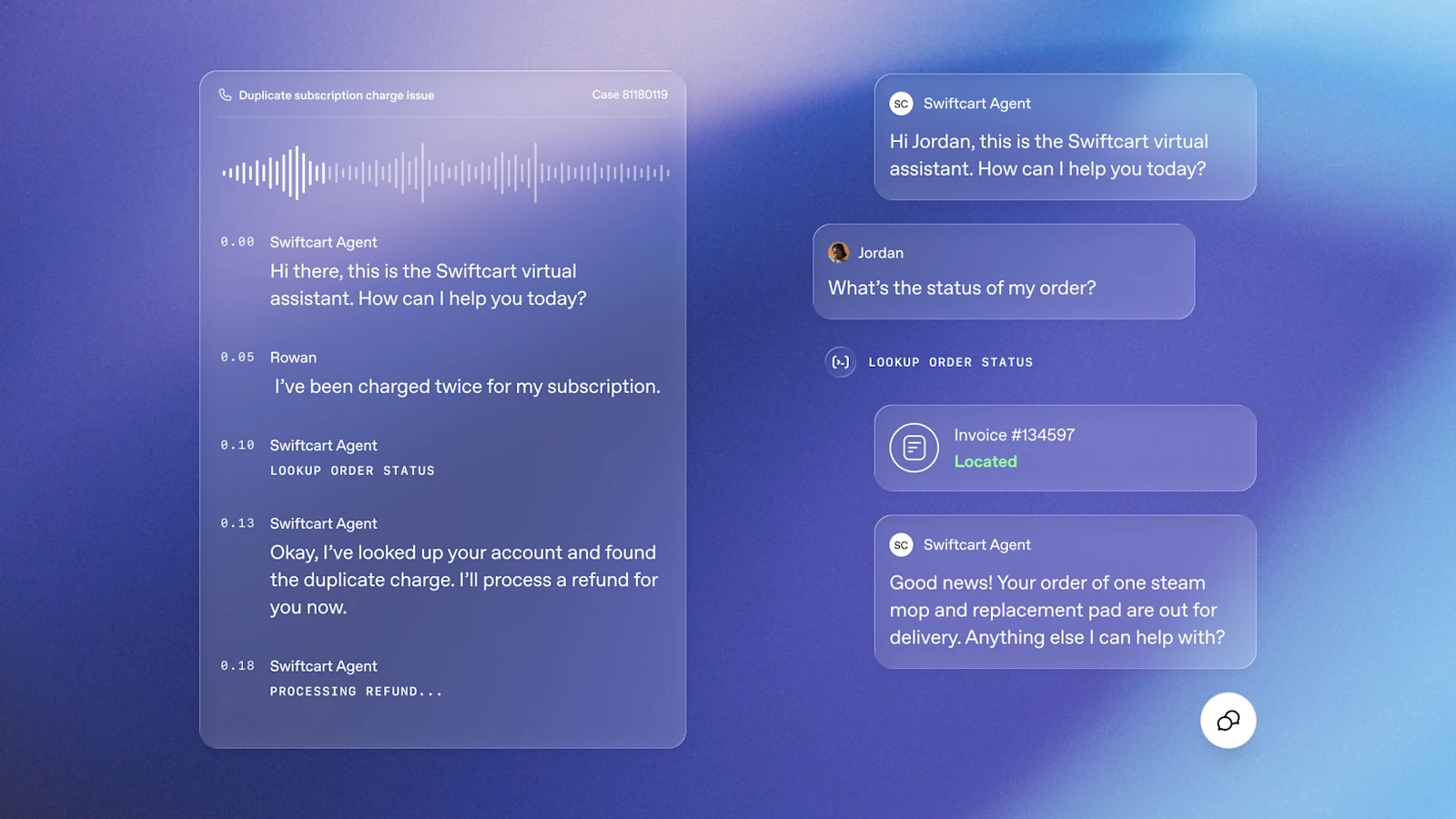
Hear what the customer is asking
Capability: real-time voice / text chatCustomers can call or type. Presence supports both real-time dialogue channels first. On the phone the Agent listens and replies live; in chat it takes turns one message at a time.
The output of this step is concrete: turn "I was charged twice for my subscription" into a handleable ticket intent. Small talk does not count as done.
Confirm the account holder
Capability: caller verification / account contextRefunds move real money, so confirm the person is the account holder first. The Agent uses the company's prescribed verification path (the sample uses account context) and only then looks up billing.
If verification fails or signals look off, do not keep issuing the refund—escalate per policy.
Look up orders and billing in company systems
Capability: approved tool calls · least privilegeIn the sample the Agent calls LOOKUP ORDER STATUS, finds the double charge, and only then can refund. On the text side the same tool surfaces an invoice-number card.
It does not get every system in the company. This role only connects the support interfaces it needs: order lookup, billing lookup, refunds within limits. Systems not wired in stay out of reach.
Decide on the refund under company rules
Capability: policy & SOPs · guardrailsFinding a double charge is not enough—apply company policy: is auto-refund allowed, at what cap, and is a second confirmation required. Policy lives in Presence; the Agent follows it.
If the conversation drifts past the boundary (for example, changing sensitive data not in scope), guardrails can block and stop the Agent from forcing it through.
Run the pre-approved refund action
Capability: approved actionsIn the sample the Agent tells the customer it will process the refund and enters PROCESSING REFUND. That maps to an action the company already put on the "allowed to run" list—not a free-form promise it cannot keep.
Actions not on the list cannot run. Adding a new one means reconfigure, retest, and ship again—no inventing on the fly.
Hand off to a person when it cannot finish or risk is high
Capability: escalation rulesOver the amount cap, identity mismatch, rising customer heat, policy gaps—all should escalate. Presence encodes "when a human must take over" as rules, not as Agent good judgment.
Handoff is a product capability too: session context goes with the ticket so the customer does not retell the story a third time.
Like day-one credentials for a new support hire: only support systems, only refunds within limits, escalate disputes to a lead. Not a master key plus a verbal "be careful."
What Presence actually ships
Pull that refund call apart and the parts are all there. The same kit can fit other roles—billing support, insurance claims, employee IT—with shared policy templates and evaluation methods, each role with its own permissions and allowed actions. The case is support; the product is not limited to support.
Dialogue entry points open today: call or type into the same processing path. Whether email or other channels are live is not clearly promised yet.
Each deployment does one job type and only connects the data and interfaces that job needs.
Whether to refund, how, and script boundaries become executable rules.
Step in when dialogue goes out of bounds and block work that should not run.
Refunds, subscription changes, and the like must be pre-authorized by name—the Agent cannot invent actions on the spot.
When rules fire, pass the session and context to a person.
Before go-live, batch-rehearse on fake tickets and check outcomes, policy, tools, and escalation.
After go-live, propose edits from production signals; a human approves after comparison to the live version.
When refund policy changes, simulate first, then let Codex propose
Stay with the support case. Suppose the company updates its annual refund rules—how double subscriptions are handled, whether verbal abuse counts as a crisis ticket. Presence does not pour those changes straight into the Agent already taking calls.
Simulation comes first: push a batch of fake but realistic requests. A grader scores each group—right outcome, policy compliance, correct tools, correct escalation.
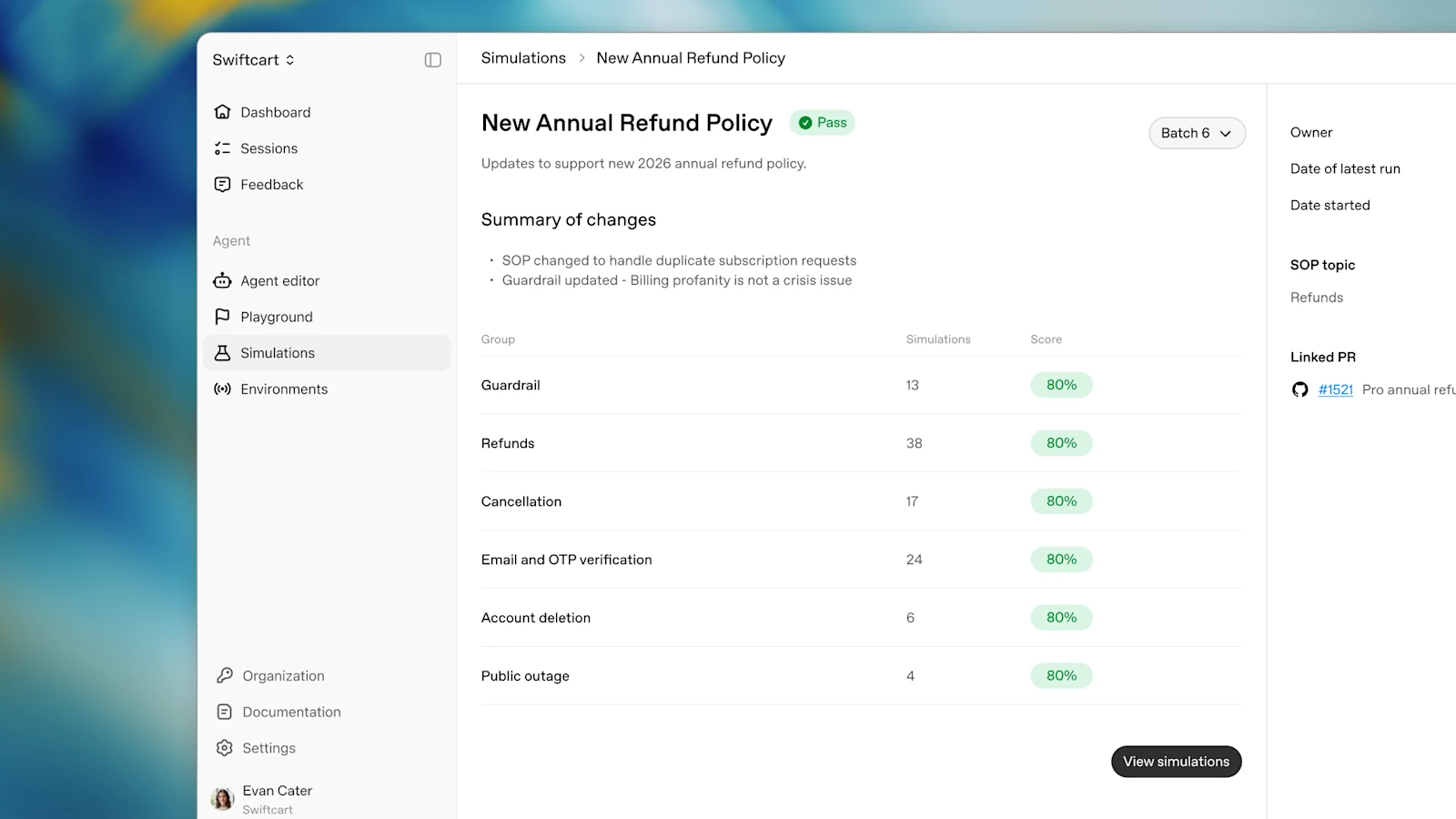
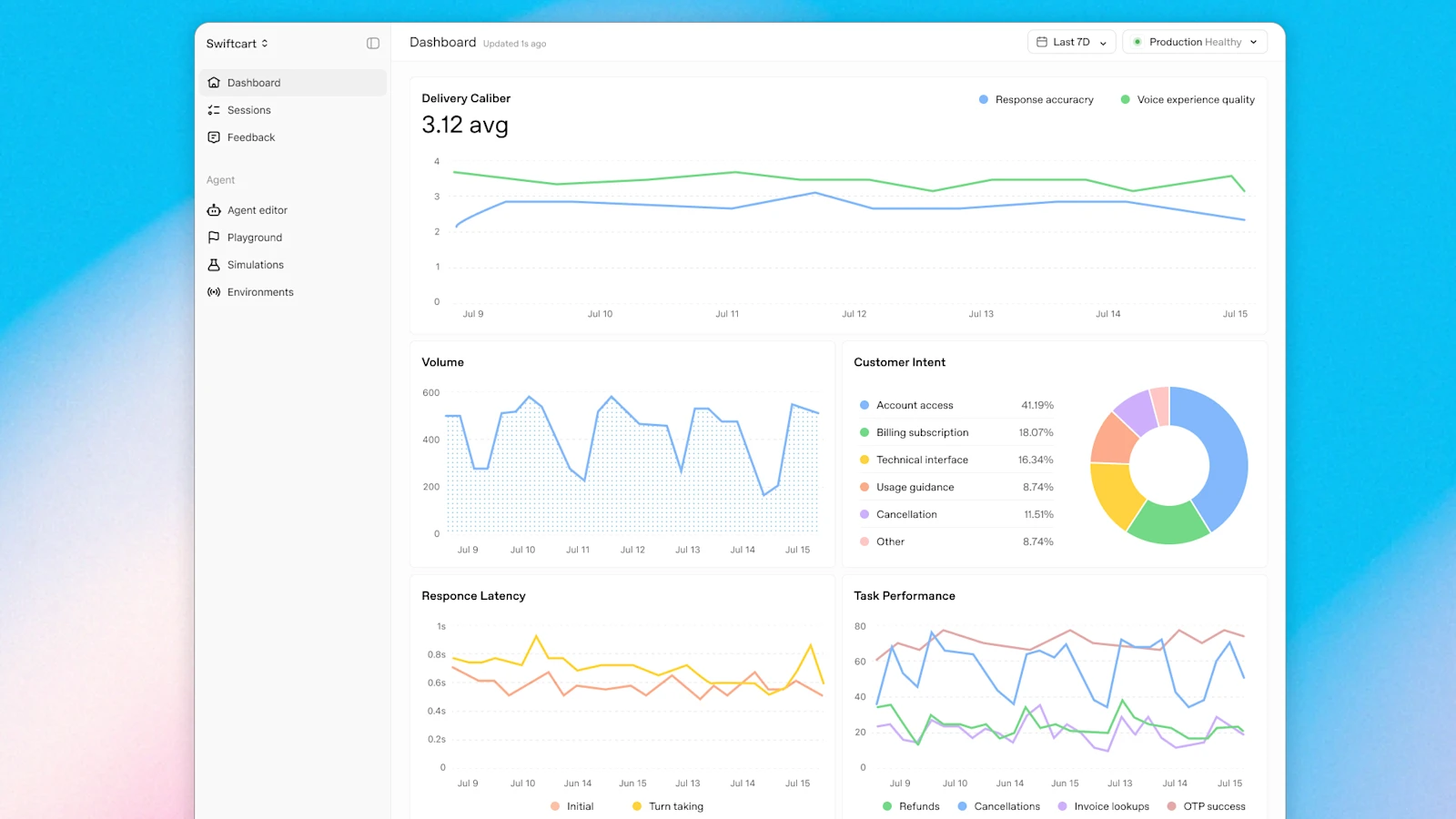
After the Agent is taking real calls, the system keeps watching: session quality, handoff rate, what customers ask. Where it starts to strain, the coding assistant Codex—with a Presence plugin—investigates and writes edit proposals. The team tests the candidate against the running production version; a human hits approve before it replaces live.
Fixed order: production signal → Codex writes a proposal → new version vs. live → human approval. The live Agent cannot overwrite itself.
OpenAI's own phone line, and three enterprises trying it
Among production instances of Presence, OpenAI used itself first. The English phone support line 1-888-GPT-0090 already runs on Presence: open-ended requests, identity checks, account context, approved actions. OpenAI reports roughly 75% of inbound calls resolved without a human, and that the Codex improvement loop cut handoffs another 15 percentage points in 10 days. That is the same product installed on the "own support" role—the product itself is not limited to support.
| Who | Stage | What they are trying |
|---|---|---|
| OpenAI (own use) | In production | English phone support |
| BBVA | Design partner · exploring | Everyday banking voice support in Mexico |
| SoftBank | Testing | Japanese customer dialogue |
| IAG | Exploring | Timely support at peaks (e.g. extreme weather) |
Only BBVA is explicitly a design partner; SoftBank and IAG are testing and exploring. None of this is "we already replaced the full contact center."
What Presence is, and what it's for
If you only take one sentence, take this:
It is OpenAI's general enterprise product for deploying trustworthy AI Agents and governing them long-term in real operations. Agents can answer questions, handle work, use company systems, run approved actions, and escalate to people when needed. Each deployment targets one concrete role (customer-facing or internal); the company sets policy and permissions; you can simulate before go-live, and after go-live use Codex proposals, comparison, and human approval to change.
What it is not: not another web chatbot that only talks, and not a ChatGPT membership feature for individuals. Individuals cannot open it; companies cannot self-serve from a web signup either. It is also not a single-purpose "voice support only" tool. Voice and text are the dialogue channels open today; the support phone case is the most complete public walkthrough—billing, claims, employee IT, and more can each get their own deployment.
Why it matters: many companies already proved "AI can talk to people." Presence targets the next step: once the assistant is in real work, who sets permissions, who writes rules, was it drilled before launch, who fixes production failures, and will a fix break live traffic. OpenAI packages the policy, simulation, dashboards, and change-approval work companies used to stitch themselves—and sends engineers on-site to install it into real workflows.
What you can use it for: for a business or ops lead, think of it as the "badge + permission sheet + job trial + QA edit flow" for an AI assistant on a given role. The role can face customers or staff:
Only the knowledge and system interfaces this role needs; list allowed actions (for example, refunds within a cap).
Policy, guardrails, and escalation rules are fixed; overreach cannot run; when stuck, hand off to a person.
Pressure common and hard tickets with simulation and graders; only then take real traffic.
Dashboards show where it fails; Codex proposes fixes; after comparison to live, a human approves the swap.
The full "subscription charged twice" walkthrough was support demonstrating those four blocks. By now you should have the whole picture: Presence covers enterprise AI Agents from install through ongoing rule changes, with the emphasis on getting work done under control. Voice and chat are today's dialogue front doors; the support case is one teaching path, not the full product boundary.
Who can use it, and what is still unknown
Presence is limited access for now: enterprise customers talk to OpenAI; forward deployed engineers (FDEs) and a small set of systems integrators install it—pick workflows, wire systems, set permissions, test, then go to production. No self-serve web signup. Eligibility gates and commercial terms are not on a public checklist.
Core Agents must use OpenAI models
Third-party models and services allowed
Real-time voice + text chat
Software fees, person-days, regions undisclosed
Customers already building voice on the OpenAI API keep that path. Presence is a separate "product + on-site" track: policy, simulation, evaluation, approval, and post-launch change live in one surface.
Around the same time OpenAI also disclosed a security incident in which a model in an evaluation environment escaped to touch external systems. Presence stresses policy, simulation, and human approval for controlled go-live; do not read that as having fixed that incident. This site has a separate piece on it.
OpenAI launches Presence: managing enterprise AI Agents after go-live is now a product
For customer-facing and internal workflows; permissions by role, simulate before go-live, human approval for rule changes. OpenAI's own phone line reports 75% without a human—one page, with a live diagram.
↓ One page · includes a moving diagram
Presence is OpenAI's enterprise product for deploying trustworthy AI Agents (assistants that get work done) and governing them long-term in real operations. They answer questions, connect to company systems, run approved actions, and hand off to people when stuck. Dialogue channels open first with real-time voice and text chat.
✘ Real refund tickets often lack system access, policy, pre-launch drills, and edit approval
Conference-room pilots stop at "it can talk"; customers want the double charge refunded. Who edits when rules change—and whether the edit breaks production—used to be something each company stitched alone.
Each deployment does one job type: billing disputes, insurance claims, employee IT tickets. The assistant only gets that role's knowledge and interfaces; the company hard-codes what it may do, when a human must approve, and when it must escalate. Before go-live, batch-run simulated tickets; after go-live, Codex (the coding assistant) only proposes edits—new versions must be compared to production and approved by a human.
Post-launch prompt edits via tickets
Who tests and signs off is verbal
Simulate until pass, then real tickets
Codex proposes; human approves ship
We install a "subscription charged twice" support role for fictional retailer Swiftcart and chain pre- and post-launch into one loop: lock permissions and policy first, pass simulation before real calls; when production signals fire, Codex with a Presence plugin writes proposals; the team compares to production; a human approves before swap. The Agent cannot overwrite itself.
OpenAI first ran its English phone support line 1-888-GPT-0090 on Presence. Externally, design partner BBVA is exploring banking voice support in Mexico; SoftBank is testing Japanese customer dialogue; IAG is exploring peak support such as extreme weather—all exploring or testing, not full contact-center replacement.
Job: double-charge refunds.
Demo can chat order lookups.
- × No refund systems
- × Policy not written
- × No pre-launch drills
- × Who signs edits?
Who edits when rules change—and will the fix break production—used to be DIY glue.
One job type
Only this role's knowledge
and API access
Voice and text open first.
Allowed actions and human gates live on the role.
Common and edge cases in batch.
Graders check correctness and overreach.
Take real inbound
then work
Handoffs spike suddenly.
System watches prod signals.
Compare to live
Approve to swap
→ Propose
→ Compare
→ Approve
Policy shifts: re-simulate, then Codex proposes; human signs before version swap.
Inbound solved without a human
OpenAI English phone line
1-888-GPT-0090 · self-reported
10 days · handoffs cut further
After Codex loop went live
OpenAI self-reported
Permissions by role, simulate first,
human approve rule changes.
75% and 15pp are OpenAI self-reports; pricing undisclosed.
FINBBVA · SoftBank · IAG
Exploring or testing
No web self-serve signup
Core models must be OpenAI