LangChain Ships OpenWiki 0.1.0: Proactive Memory for AI Agents — Auto-Pulls Gmail, Notion, Git, X into a Local Wiki
- LangChain released OpenWiki 0.1.0, expanding the open-source CLI tool — originally built just for codebase documentation — into a general-purpose memory framework called OpenWiki Brains.
- New Personal Brain mode: connects six source types — Gmail, Notion, Git repos, Twitter/X, Hacker News, and web search — to auto-generate a local Markdown wiki that agents can draw on.
- Updates run via a local scheduled job (installed as a LaunchAgent on macOS), pulling new information and refreshing the wiki on a schedule you set — no server or background process required.
- The original codebase-documentation feature is renamed Code Brain and now coexists with Personal Brain — both share the "generate and maintain a wiki" approach but serve different use cases.
- The project is open source — install with npm install -g openwiki; the team previewed upcoming additions: a Slack connector, LangSmith traces, full-text/semantic search, and MCP support.
What LangChain Just Shipped
OpenWiki started out as a codebase documentation tool: run it inside a repo and it generates a wiki, then keeps that wiki updated automatically as the code changes — that's the reason LangChain built the project in the first place. With 0.1.0, the team took that same "generate and maintain a wiki" idea outside the code repo and applied it to more everyday work — writing, research, client management.
npm install -g openwiki. A Slack connector is already on the roadmap, with the team saying it's coming soon.
Today's Agent Memory Only Remembers What You Said
- Remembers facts and preferences you've explicitly told it
- Can infer information from your conversations with it
- Depends on you speaking up, or pasting content into the conversation
- Connects to sources like Gmail, Notion, Git, X, Hacker News, web search
- Proactively looks for relevant information in those places based on the focus you set
- Writes it into the local wiki automatically — no need for you to say or paste anything
Take a newly added meeting note in Notion, a useful email in your inbox, or a tweet you bookmarked on Twitter/X — even if you never paste that content into a conversation, OpenWiki Brain can still proactively pull it into the local wiki for later use.
Personal Brain: Getting the Agent to Find What's Worth Remembering, on Its Own
The team ships a default focus prompt built for general personal-assistant use, but you can rewrite it yourself — say, to zero in on the projects you're running, an AI topic you're researching, background on a client you're working with, saved links, or recent notes in a given Notion workspace. That one sentence is what OpenWiki uses, as it ingests new information, to decide what to keep and what to skip.
Raw data first lands in the local ~/.openwiki/connectors/<connector>/raw/ directory (fill in the connector name for connector), gets distilled in this step, and is then written into ~/.openwiki/wiki/, ready for the agent to read as context in later sessions.
Six Sources, Two Ways of Fetching
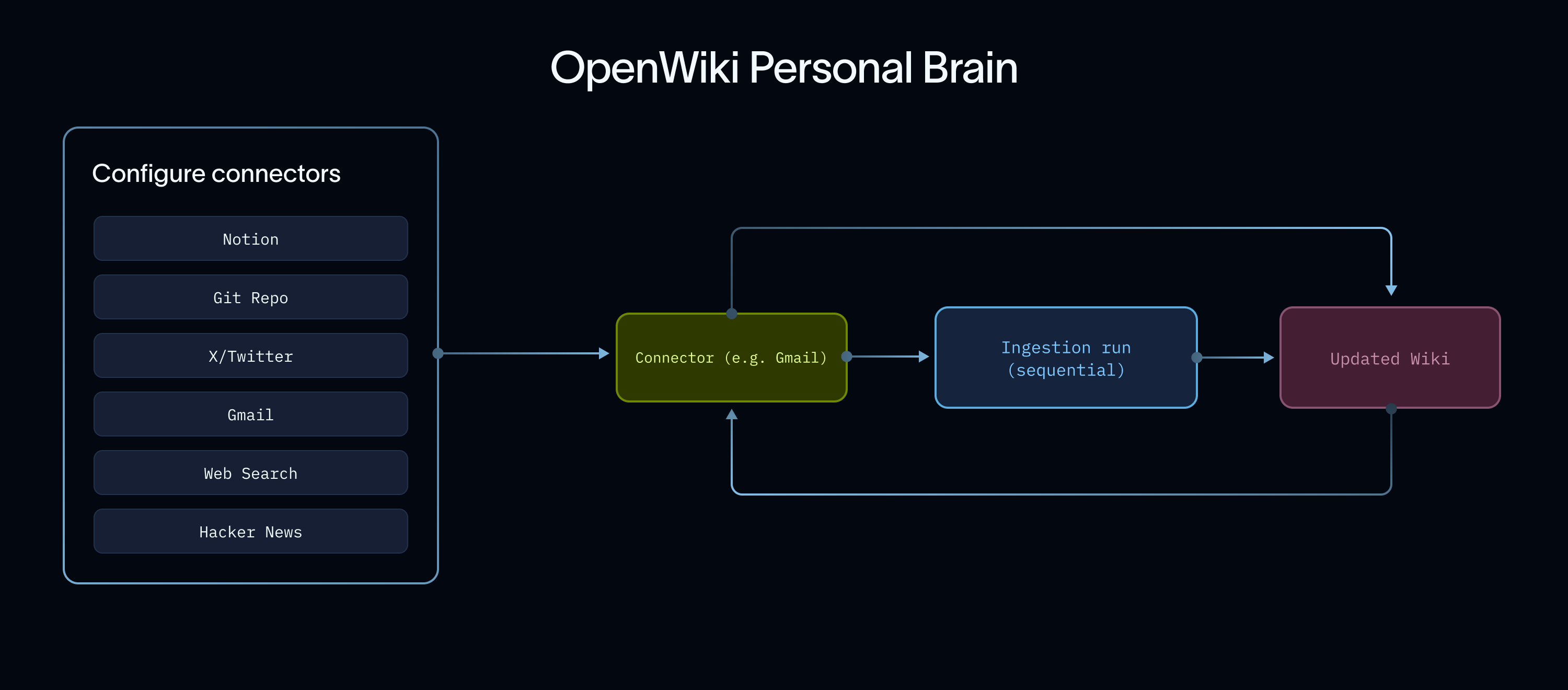
Deterministic connectors have a clear answer to "give me the latest": the newest emails in your inbox, the newest tweets on your timeline, the newest commits in a repo — just pull by time. The other kind of connector isn't so simple: Notion workspaces and web search don't have a unified notion of "latest" at all, so an agent has to go looking on its own, armed with the focus you set, and judge for itself what's relevant.
The former is like pulling a list straight from "recent calls"; the latter is like handing a secretary your focus notes and having them dig through the filing cabinet for relevant material.
- GmailFetched via the Gmail API using OAuth user credentialsPulls recent emails
- Twitter / XSupports scopes like main timeline, your own tweets, mentions, bookmarks, and list tweetsPulls the recent timeline or bookmarks
- Hacker NewsUses Hacker News's public feed and search API, no account authorization neededPulls the latest posts
- Git RepoReads locally configured repo paths and writes out a concise summaryChecks recent commit history
- NotionConnects to Notion's officially hosted MCP service via Notion OAuth login, not by pasting a token directlySearches the workspace guided by your focus
- Web SearchUnder the hood it calls Tavily via LangChain, requiring a configured TAVILY_API_KEYSearches the web guided by your focus
How the Memory Stays Fresh
On macOS, this scheduled job installs as a built-in LaunchAgent: no extra server to install, no process sitting around in the background — it just runs the fetch-and-refresh script on schedule, exits when finished, and logs locally. The whole flow only needs the sources configured once; the rest is maintained automatically in the background on schedule.
How Does This Relate to the Original Code-Documentation Feature?
- Runs inside a git repo
- Focuses on code structure, commit history, file relationships, coding conventions
- Generates docs into the repo's openwiki directory and inserts reference blocks into AGENTS.md and CLAUDE.md
- Connects to multiple source types — Gmail, Notion, Git, X, Hacker News, web search
- Focuses on cross-tool work context — projects, research topics, client background
- The generated wiki lives locally in the ~/.openwiki/wiki/ directory
The two use different connectors, prompts, and update methods, but the underlying idea is the same: generate and maintain a body of context the agent can call on anytime.
What You Can Get Right Now
- The generated wiki is plaintext Markdown — you can view, search, and version-control it right through the file system, with nothing locked into some dedicated interface.
- The same connector can be configured with multiple instances — say, two web-search sources on different topics — each fetching and updating independently.
- For developers already using AGENTS.md or CLAUDE.md as agent instruction files, Code Brain automatically inserts reference blocks pointing to the wiki right into those files — a low-cost setup.
- You choose the model that runs the wiki: OpenAI (defaulting to gpt-5.6-terra), Anthropic, OpenRouter, Fireworks, Baseten, and any OpenAI-compatible endpoint are all supported out of the box; if you have a ChatGPT subscription, you can log in via the browser and run on your subscription quota instead of buying separate API access.
- Code Brain comes with ready-made GitHub Actions / GitLab CI workflows: docs update automatically when code changes, with a PR or merge request opened automatically.
npm install -g openwiki@latest
openwiki personal --init
What's Still Missing — the Team Says So Themselves
- More connectors: Slack is coming soon, with LangSmith run traces and local Claude/Codex sessions also planned as future sources.
- Better retrieval: right now a brain is just a wiki sitting in the file system. Directions the team plans to try next include full-text search, MCP, semantic search, and letting the agent do its own retrieval across all of these.
- Better formats: Markdown is just the starting point — cross-page linking and richer knowledge formats (including directions like Google's proposed Open Knowledge Format) are all under consideration.
Built-in memory helps an agent remember what you've told it. OpenWiki Brain helps it remember what's happening in the places you already use.LangChain Blog, "Introducing OpenWiki Brains," 2026-07-10
AI Assistant Memory: From Only Remembering What You Say → Proactively Taking Notes Where You Already Work
LangChain added a "proactive memory" mode to the open-source tool OpenWiki, connecting to six places like Gmail, Notion, and X to auto-generate local notes — explained in one page with diagrams.
↓ Read it in one page · includes an animated diagram
OpenWiki is a small open-source tool from LangChain that originally did one thing: automatically generate and maintain documentation inside a code repo (that part is now called Code Brain, and it's still around). It serves "AI agents" — assistants like Claude and ChatGPT that can do work on your behalf.
Most of these AI assistants now come with built-in memory, but there's a blind spot.
✘ Can't remember information scattered across Gmail, Notion, X bookmarks, Hacker News — stuff that changes every day
That's because built-in memory is "passive": it only remembers what you actively say, or what it can infer from the conversation. If you don't paste an email, a note, or a bookmark into the conversation, it simply can't reach it — and these are places that update every single day.
OpenWiki 0.1.0 adds a Personal Brain mode built specifically to fix this blind spot.
You connect Gmail, Notion, Git repos, X, Hacker News, and web search, then tell it in one sentence what to care about. It automatically goes looking in those places for relevant information and organizes it into a note stored on your own computer (Markdown, plain text, open it anytime) that your AI assistant can read at will — and it refreshes automatically in the background on the schedule you set, no manual tidying required.
- Every new session, you had to dig through relevant emails, notes, and bookmarks yourself and manually paste them into the conversation
- Or have the AI search on the spot each time — slow, and unreliable
- Configure once; it's organized into a local note automatically in the background, and your AI assistant reads it directly when it gets to work
- Two lines to install, and you never have to feed it repeatedly again
Once it's set up, how does it actually go find what's worth remembering, and how does it handle six sources that each behave differently? One diagram makes it clear.
Take site owner XiaoHu as an example: he runs a media account and tracks AI industry news every day. He wrote OpenWiki one line of focus — "only care about new AI products and research" — and everything else runs on autopilot.
What this saves isn't "a few seconds" — it's the effort of "starting over every single time."
emails, notes, bookmarks
all dug up and pasted in
"That bookmark from last week?"
- × Only remembers what you say directly
- × Can't reach emails, notes, bookmarks that change daily
lets AI find what's worth remembering itself
Now: it proactively takes notes
at the places you use daily
general memory
how does it fetch?
No "latest" → searches with a goal
connected at once
HN · Git
Web Search
it reads that local note itself
on schedule
now it goes to the places you use every day and notes down what's worth remembering, on its own.